Sunday, September 17, 2006

What is LXI?

A comment on an older post asked about LXI. What is LXI, and what does it mean for LabVIEW users?


LXI stands for LAN Extensions for Instrumentation. The name follows in the fine tradition of VXI (VME Extensions for Instrumentation) and PXI (PCI Extensions for Instrumentation). There's a standards body that defines the LXI standard, which specifies what an instrument has to satisfy in order to get an LXI logo on its front panel.


LXI defines three classes of conformance. Class C is the simplest—basically the instrument has to have an Ethernet port and be able to serve up a web page. (There are many more operational details in the spec, such as specifying how devices get an IP address.) Class B adds IEEE-1588 timing and synchronization (see below). Class A adds a Wired Trigger Bus, which provides more precise timing and synchronization than you can get over Ethernet. (Again, I'm simplifying to what most users need to know. There are many operational details required for true conformance. Read the specs.)


Many Class C devices are just repackaged versions of older GPIB designs, adding Ethernet as a new way to talk to your DMM or Oscilloscope. (Many devices include connectors for Ethernet, GPIB, and USB in one package. Ethernet gives you distance. USB gives you plug and play simplicity. And as one test engineer put it, "GPIB just works".


Class A and B devices add complexity (and cost) in order to get better timing and synchronization. Most of the LXI-compliant devices available now are class C.


To be clear, National Instruments is not a member of the LXI Consortium. But I do pay attention to it. I've read the standard. I've been to some of the meetings. I've programmed a test system of LXI devices. I have firsthand experience with LXI.


LXI — Yet Another Way To Build a Test System


One of the many marketing messages behind LXI is that it is the "successor to GPIB". I think a more realistic message is "yet another way to build a test system". LAN-based instrumentation systems have their pros and cons. There are some things that are better than GPIB. There are some things that are worse.


LabVIEW is the best way to build a test system, LXI included. (Maybe I'm a bit biased. ;-) As T&M World editor Rick Nelson said recently in his LXI blog, the reality is that a lot of test systems are going to contain a variety of bus technologies. The purpose of VISA was to make it easier to incorporate new bus technologies into existing test systems. Work was done in the mid-1990's to produce the VXI-11 standard for Ethernet-based instrumentation. LabVIEW and VISA have been supporting LAN-based devices for years.


When is LXI right for you?


The one clear advantage that Ethernet has over most other bus technologies is distance. You can distribute instrumentation across the globe and talk to those devices over the internet. However, the further you distribute nodes on Ethernet, the more you run into issues with security, reliability, and timing and synchronization.


The LXI Consortium realizes that timing and synchronization are hard to handle, since you have less control over how packets are propagated through the network. That's why LXI adopted the IEEE-1588 standard for precision timing over Ethernet.


With IEEE-1588, you can trigger across a network with an accuracy of less than a microsecond. This level of accuracy has some constraints. You can only get this accuracy if you're connected through a simple network hub. Most corporate networks (and many home networks) use a network switch or router. These devices slow packet transfer by a few microseconds. It's imperceptible when viewing web pages, but these delays could cause problems in a high-end RF test system. NI has a PCI-1588 Ethernet controller. We publish 1588 synchronization specs for different network configurations in our PCI-1588 data sheet.


So, while LAN-based instrumentation is great for distributing systems across the miles, IEEE-1588 synchronization works best in small closed networks. (Note: IEEE-1588 is currently being revised to have higher accuracy. It appears the new version will not be backwards compatible with the current version.)


LXI—Simpler Cabling?


Here's an example of why no one pays me to build test systems...
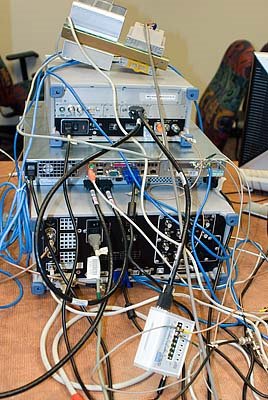


This shows the back of a test system built mostly out of LXI class A devices. Ethernet cables, Wired Trigger Bus cables, RF signal cables, power cables. Before it goes anywhere, we'll clean all this up. My point is that LXI doesn't necessarily simplify cabling.


GPIB allows us to daisy-chain devices together. Ethernet, on the other hand, requires that all the cables go back to a central network hub. (In my case, a $4000 IEEE 1588 network hub.)


"Hello. It's your IT department. What are you doing to our network?"


One choice to be made in constructing an Ethernet-based test system is whether to use a private network (i.e., no connection to the outside world), or whether to hook it up to your corporate network. In some companies, plugging an LXI device into the corporate network will evoke a response similar to calling the fire department. "Bandit in cubicle 3A101! What is that device?!?! What viruses is it spreading?! Security breach! Lock the doors!" Fortunately, I don't work in such a company. But many of the more expensive new measurement instruments run some form of Microsoft Windows, and our IT department is definitely concerned about having those systems up-to-date with patches and anti-virus software.


Once you get past the IT issues, there are some practical concerns. On a corporate network, you don't always control the traffic going over your part of the network. This affects timing and synchronization, to be sure. But more practically, I've seen LXI test systems interrupted in the middle of measurement because someone decided to probe the network searching for LXI devices. The LXI Consortium recognizes the problem and has begun working on a solution (called "resource locking"), which will eventually make it into the specs.


Issues like these push engineers to use a private network, but then you'll start to miss your IT department. You'll have to provide your own DHCP server (or do without and configure static IP addresses, like I did). You'll have to provide your own DNS server (or do without, and refer to devices with IP addresses the way I did: "TCPIP::192.168.200.2::INSTR").


Summary


Key takeaways...


  • LXI — Yet another way to build a test system
  • LXI — Yes, you can talk to it from LabVIEW

I have a lot more I could say about LXI. Let me know what you want to hear.


Read more of this article...
Tuesday, September 12, 2006

IVI-C and IVI-COM, Part 2

In my last post, I compared IVI-C and IVI-COM drivers, but left one issue hanging. From a usability point of view, it's perhaps my biggest concern with IVI-COM.


In one of the IVI specifications, there's a sentence that reads...


When an IVI class-compliant specific driver implements instrument specific capabilities, the driver should export those capabilities in a way that is consistent with the class-defined capabilities.

This is a good thing. It means that when a user learns one IVI driver, they will have learned something about all IVI drivers that belong to the same class. It means that drivers are consistent with terminology, units of measure, and API structure.


If only it were true...


The quote above uses the word "should", which in software requirements parlance means, "it would be nice, but you can really do whatever you want". As you might expect, some vendors choose to do their own thing.


Well, the quote is actually half true. Because of the way that interchangeability of drivers works with IVI-C, specific drivers pretty much have to match the class drivers. But IVI-COM drivers can publish two different, disjoint interfaces--one for the class and one for the specific interface. So my beef is limited to IVI-COM drivers.


Let me give you an example. Looking at an IVI-COM driver from a major oscilloscope manufacturer, it has a class-compliant interface call IIviScope, and a specific-driver interface called ITekScope. If I want to set up "TV Triggering" on the scope, I can use the IIviScopeTriggerTv.Configure() method and pass in a polarity...


IVI Scope Class Interface:


Member NameDescription
IviScopeTVTriggerPolarityPositiveConfigures the oscilloscope to trigger on a positive video sync pulse.
IviScopeTVTriggerPolarityNegativeConfigures the oscilloscope to trigger on a negative video sync pulse.

Compare this with the ITekScopeTriggerVideo.Configure() method. (Even the interface name uses different terminology--"Video" vs. "TV".). This method also takes a polarity...


Specific Driver Interface:


Member NameDescription
TekScopeTriggerVideoPolarityInvertedInverted. Sets the oscilloscope to trigger on a positive video sync pulse.
TekScopeTriggerVideoPolarityNormalNormal. Sets the oscilloscope to trigger on a negative video sync pulse.

So let me summarize... "Positive" means "Inverted", and "Negative" means "Normal". Got that?


That's just one example. There are many more. So why would a vendor do this? I think there are a few possibilities...

  • The vendor thinks their API is better than what the IVI Foundation came up with.
  • The vendor has an existing driver (e.g., a VXIpnp driver) that they want compatibility with. Given the choice of compatibility with IVI and compatibility with an existing driver, they went with the latter.

Further, ask an instrument vendor which IVI-COM interface you should use, and they'll lead you to their specific driver interface. It incorporates all the functionality of the instrument, while the class interface only supports things that all scopes support. And it keeps you in their proprietary world.


I think there's something to be said for consistency with an industry standard. That's why LabVIEW 8 ships with instrument driver templates patterned after the IVI classes, and why we added tools to make it easy to create your own drivers that start with those templates.


IVI-C demonstrates that vendors can add specialized functionality to a driver, while still keeping it consistent with other drivers. IVI-COM failed to do this.


Read more of this article...

Thursday, September 07, 2006

IVI-C and IVI-COM

In an earlier post, I described different flavors of instrument drivers. One kind of driver is called "IVI". These drivers actually come in two different forms: IVI-C and IVI-COM. In this article, I'll try to explain how each is used in LabVIEW, and how they are very different kinds of drivers.


Neither IVI-C nor IVI-COM drivers are written in native LabVIEW code. All of the IVI drivers that National Instruments makes are written in C (hence the name "IVI-C"). Their design was primarily intended for C developers, such as those using LabWindows/CVI. The IVI drivers that NI creates do come with source code--but you have to have at least some C programming skills to modify and recompile the source.


To use IVI-C drivers in LabVIEW, we provide wrapper VIs. If the C source code has a "DMM_ConfigureMeasurement" function, we create a wrapper VI called "DMM Configure Measurement" that knows how to call the C entry point. So even though the source code is C, the experience is pretty much the same as a native LabVIEW source code driver.


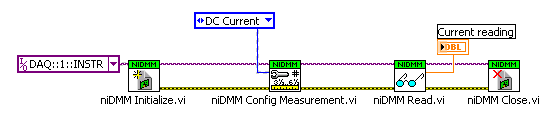
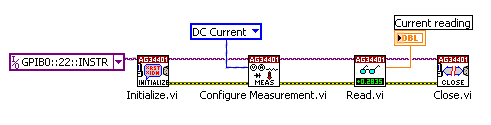
As an example, here's what the diagram looks like using a native LabVIEW DMM driver...


(Click to enlarge)

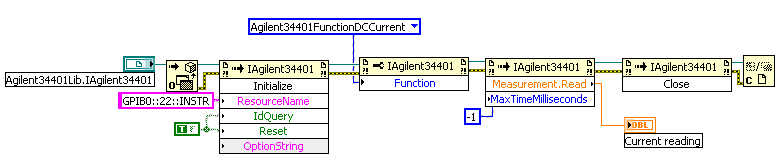
And here's a similar diagram using an IVI-C driver with a LabVIEW wrapper around it...


(Click to enlarge)

As you can see, the LabVIEW driver and IVI-C driver are nearly identical when used on the diagram.


Now let's compare this with an IVI-COM driver. The structure is similar, so at first glance, it would seem that IVI-C and IVI-COM drivers are equivalent.


If you dig a little deeper, you'll see that there are some issues. I want to highlight a couple of things...


  • Usability of the driver types when creating your application
  • Differences between the IVI-C class and specific interfaces, and the IVI-COM class and specific interfaces

The latter topic is worthy of its own post, so I'll briefly focus on a few of the usability concerns.


Default parameters


One very simple usability item is that subVIs can have required, recommended, and optional inputs, and they can have default values if you leave them unwired. IVI-COM drivers, on the other hand, have only required and optional arguments, and most are required. In the picture above, note that Initialize and Read both had parameters that I was required to wire in the IVI-COM case, but could ignore in the subVI case. It's a small thing, but it adds more objects and clutter to the diagram instead of letting me focus on the important stuff.


Instrument drivers in the palettes...


Here are a couple of the palette menus showing part of a VI-based driver...


It's easy to see the available functions. The help menu shows you the parameters as you hover over each item in the menu.


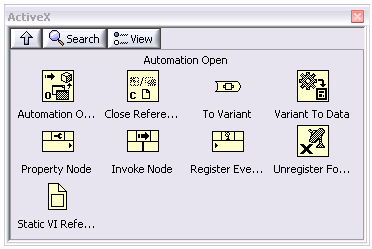
With IVI-COM drivers, though, you start with the generic ActiveX functions...


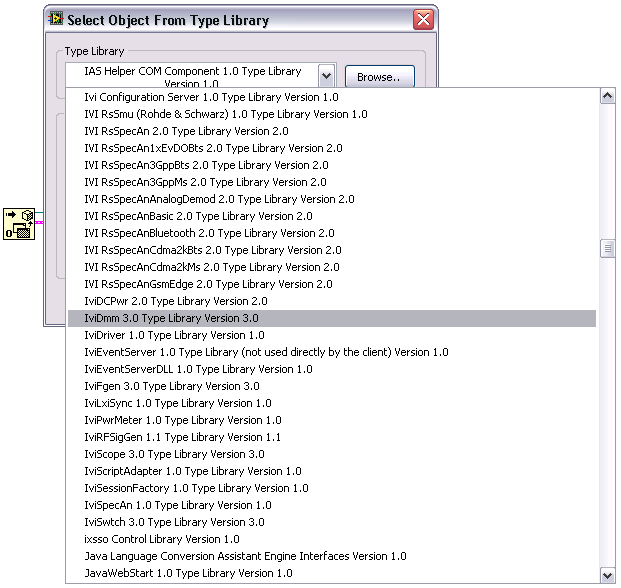
You have to drop an "Automation Open", find the right class in a very long list of all the ActiveX objects installed on your computer...


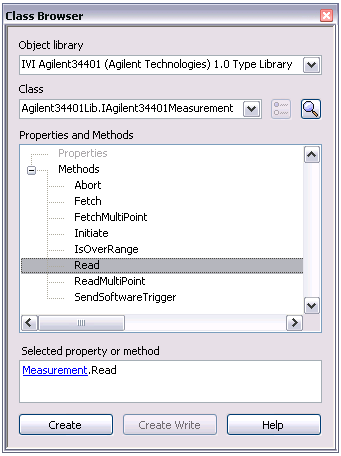
then drop Invoke and Property nodes to explore the class. And I do mean "explore". I had to hunt just to find the "Read" method. I thought it would be a top-level method of the top-level object, but you have to get to the "Measurement" sub-object and use its "Read" method.


LabVIEW 8 introduced the LabVIEW "Class Browser", making it easier to navigate deep object hierarchies. This is how I found the "Read" function, which has got to be one of the most important functions in the driver, buried deeply...


Let me summarize this post with something we've been saying for a long time. There's no one-size-fits-all driver that is perfect in every development environment. IVI-COM drivers are easiest to use in Visual Basic 6. LabVIEW Plug and Play drivers are easiest to use in LabVIEW. VXIpnp and IVI-C drivers are easiest to use in C environments. That may sound like common sense, but a lot of instrument vendors are having a hard time with this because they don't want to spend the time and effort (read "money") to support multiple environments.


Fortunately, some vendors are coming around to the idea.


Next time, I'll talk about one of my biggest technical issues with IVI-COM drivers. It all boils down to a specification document that says "should" instead of "shall".


I encourage you to post your own comments about the different kinds of driver technologies.


Read more of this article...

Thursday, August 31, 2006

"NI Open"

Yesterday, I saw a new posting on the LXI Blog of Test & Measurement World's Chief Editor, Rick Nelson.


I chatted with Rick at one of this year's NIWeek parties. He's a nice guy. We talked about a variety of topics, ranging from NI's involvement in engineering education, to Lego Mindstorms NXT, to LXI.


In his latest blog entry on Hybrid Instrument Systems, he talks about how NI and other vendors are realizing that most of our users are building hybrid systems with instruments from multiple vendors, using multiple bus technologies such as GPIB, RS-232, USB, PXI, and Ethernet.


While other vendors are only just now arriving at the idea of being "open", NI's been there for a long time. If you search on the National Instruments Instrument Driver Network, you'll find drivers for over 5000 instrument models from over 200 vendors. We didn't write those drivers overnight; they're the product of a couple of decades of commitment to making LabVIEW and LabWindows/CVI open platforms for our industry.

Read more of this article...

Monday, August 28, 2006

More on Instrument Drivers

As I mentioned in my last post, instrument drivers provide a somewhat higher-level abstraction for talking to instruments. If you've used LabVIEW to talk to instruments, you probably also realize that instrument drivers come in a lot of flavors--VXIpnp, IVI-C, IVI-COM, LabVIEW Plug and Play, ... I'll try to help you sort those out.


Further, you've probably seen that NI certifies some of the instrument drivers on IDNet. What does that mean? I'll try to clarify that, too.


Keep in mind that this is a very abbreviated history, and there were a lot of details I'm leaving out...


In the beginning, instrument drivers were simple...


We had a guy sitting one room over from the LabVIEW area who wrote instrument drivers. We'd borrow instruments, bring them in house, and he'd write a few VIs to get them to take measurements. (Often, he'd also write an instrument driver for LabWindows.)


There weren't any standards, but most drivers for LabVIEW and LabWindows were pretty consistent, because there was only one guy writing them.


With a lot of help from National Instruments, the test and measurement industry started to pay more attention to software. Instrument vendors and end users started writing drivers, but there were a lot of different philosophies on what an instrument driver should look like. This made it harder for end users--they might be able to find a driver for their instrument, but they didn't always know what they were getting, or how to use it.


The VXIpnp standard


VXI (VME Extensions for Instrumentation) was an instrumentation bus standardized in the late 1980's. Out of that grew a push for more standard instrument driver software in the VXI Plug and Play (VXIpnp) Systems Alliance.


This standard specified a few items common to all instrument drivers--Initialize, Close, Error Handling... But it was pretty much measurement-agnostic. Once you got past Initialize, there was no consistency in how you configured the instrument or took a measurement.


One key aspect of VXIpnp drivers is that they require the use of VISA. This paid off in the long run, since it allows us to have a single instrument driver for an instrument with serial, GPIB, Ethernet and other connectivity.


The VXIpnp standard defined standards in multiple programming languages, including C and LabVIEW. These days, though, when you hear that a driver is VXIpnp, it is almost certainly a C driver. (Which can be used in LabVIEW by creating wrapper VIs around a DLL with an automated tool you can download from IDNet.)


The IVI League and the IVI Foundation


Skipping ahead a few years, National Instruments and some our customers created a group informally called the IVI League. The idea was to take the instrument driver software standard further--defining instrument classes, such as DMMs, Function Generators, Oscilloscopes, etc., and standardizing more of the instrument driver API.


To make progress, we knew we needed to bring in other hardware vendors, and the IVI Foundation was born. Over the course of several years, the APIs were further refined, and new instrument classes added.


IVI drivers bring a lot of advanced features. Unfortunately, they're harder to write--most are written in C or C++. This means that they're harder for end users to customize or debug. It also means that there aren't as many IVI drivers as, for example, native LabVIEW drivers.


LabVIEW Plug and Play: Bringing Back LabVIEW Drivers


As I went out and visited customers, I got a lot of feedback that they weren't entirely enthusiastic about using C-based VXIpnp or IVI drivers in LabVIEW.


IVI drivers were supposed to be more robust than earlier technologies, but customers still wanted to be able to debug their test system and step through the code. Other customers wanted to restructure the driver, or make additions to it, or optimize it. Without a C programmer on staff, this was practically impossible. IVI drivers from some other vendors didn't even include source code, so you couldn't modify them.


The LabVIEW users were willing to trade off all the IVI features for a much simpler, native LabVIEW source code instrument driver--the way we originally started. This let them make their own optimizations and enhancements.


So in LabVIEW 8.0, we rolled out the idea of "LabVIEW Plug and Play" instrument drivers. The VIs leverage the structure of VXIpnp and IVI drivers, but they fit more naturally into LabVIEW, and they include native LabVIEW source code.


LabVIEW 8 Makes Instrument Drivers Easier to Use and Easier to Develop


In LabVIEW 8, we added the Instrument Driver Finder, to make it easier to find and download instrument drivers. Our instrument driver development group started developing drivers to our improved standards. We've worked with vendors to improve LabVIEW support for their instruments.


We also made it easier for our end users to develop drivers, with the Instrument Driver New Project Wizard, and Instrument Driver VI Creator. We enhanced our Instrument Driver Development Guidelines and our Instrument Driver Templates.


In LabVIEW 8.20, we've even created a tool that lets you export LabVIEW drivers to other environments that use C.


So What Kind of Driver Should I Use?


Okay, so there's the brief history. What does it all mean? For LabVIEW users that want to talk to 3rd party instruments, you should look for Certified LabVIEW Plug and Play instrument drivers. You can use the Instrument Driver Finder, or search on your own at IDNet.


If you can't find one at NI's site, ask the vendor for a LabVIEW Plug and Play driver.


If you can't find a native LabVIEW driver, you have a few options. If you can find the instrument's command set, consider writing your own; it's not that hard.


If the vendor has a VXIpnp or IVI-C driver, they may also supply LabVIEW wrappers. Those work well, but you may not be able to modify/debug the driver.


If the vendor has a .Net or IVI-COM driver, you can use it in LabVIEW using our native .Net and ActiveX programming.


Future Topics


Okay, I didn't cover a couple of things I said I would...


  • What does "Certified" mean?

  • What's the difference between IVI-C and IVI-COM

I'll work on those in upcoming posts.


Read more of this article...

Sunday, August 27, 2006

So Many Choices...

So many things to write about...

There are so many topics I could start this blog with...

  • Discussing the latest instrument control features of LabVIEW 8.0 and 8.20.
  • Building test systems--especially hybrid systems combining instruments from multiple vendors, all using different bus technologies.
  • A look at new additions to your measurement toolboxes, such as PXI Express, LXI, and synthetic instruments

And the list goes on and on. But I feel there's some groundwork I need to lay, for those of you who may be somewhat newer to LabVIEW Measurements.

So many ways to talk to instruments...

One of the good things about LabVIEW is that it is a very rich environment. One of the bad things about LabVIEW is that it is a very rich environment. We give you several different ways to talk to 3rd party instrumentation, and it's sometimes hard to sort out all the options. In this article, I'll explain some of the options and give advice for different situations.

As I'm sure most of you understand, test programs talk to instruments using low-level commands peculiar to each instrument. Many instruments are programmed through an ASCII language called SCPI. Some are programmed by writing to registers mapped into a program's address space. Some use proprietary protocols.

Fortunately, if you can find out the language that an instrument speaks, you can talk to it from LabVIEW. Vendors usually include their particular command set as part of an instrument's documentation. Most GPIB instrumentation uses SCPI, so I'll use that as an example.

LabVIEW 7.0 introduced a feature called Instrument I/O Assistant (IIOA), which makes it easy to create and test VIs that send commands to and read responses from instruments. You can place an IIOA block on your diagram, select the instrument you want to send a command to, and type in the command--e.g., "CONF:VOLT:AC" might be the SCPI command to set a multimeter to measure AC volts. Test it out, click OK, and you have your first instrument control VI.

VISA: A software standard for instrument communications

When I first started working on LabVIEW, we had two sets of icons for instrument communications... the GPIB VIs and the Serial VIs. Back then, most instrumentation had one or the other kind of port on the back of it. These days, it's not uncommon for an instrument to also have a USB port or an Ethernet port. If you throw in buses found inside PCs, we've also seen NuBus, AT-bus, EISA-bus, PCI, PXI, PCI Express, PXI Express, VME, VXI...

But, we didn't want to add a new set of icons to LabVIEW every time a new bus technology came out. In the early 1990's, National Instruments and other vendors (part of the VXI Plug and Play Systems Alliance) created VISA (Virtual Instrument Software Architecture).

The full story of VISA is best left for others, but suffice it to say that it lets us have one set of icons in LabVIEW that knows how to talk to a bunch of different buses and instruments.

We still have GPIB functions in LabVIEW. They're useful for legacy applications, and they're easier to use if you're trying to do advanced, low-level control of GPIB. But for most instrument control applications, VISA is a better approach.

Interestingly, we (more specifically, I) removed the older serial functions from LabVIEW in version 7.0. You can still do RS-232/RS-422 serial I/O in LabVIEW; you just use VISA to do this. The rationale for this decision could be another lengthy post. In short, NI's VISA implemented serial I/O faster and better than the old code, so we made the switch. But we still hear complaints about my decision.

Instrument Drivers make programming easier

An "instrument driver" is a collection of VIs that provide a higher-level interface to programming an instrument. Instead of having to remember several low-level commands to configure a multimeter or oscilloscope, you can use a single high-level function called "Configure Measurement".

Instrument drivers come in a lot of different flavors. LabVIEW Plug and Play, IVI-C, IVI-COM, VXIpnp, etc. I'll sort all those out in a future post.

The main point I want to make here is that using an instrument driver can save you a lot of time. If you can find an instrument driver for your instrument, you're almost always better off using it than using low-level SCPI commands.

LabVIEW 8 adds an Instrument Driver Finder which can help you search for instrument drivers. You can also visit IDNet, an instrument driver repository that contains drivers for thousands of instruments from various vendors.

Look for more on instrument drivers in a future post.


Post your comments. What do you want me to write about?

Read more of this article...

Sunday, August 20, 2006

Who Am I? Why Am I Here?

My name is Brian Powell, and I'm a software architect on the LabVIEW R&D team in Austin, Texas. I've been with National Instruments since early 1988. So what have I been doing all this time?

LabVIEW is a graphical programming language that scientists and engineers use to design and develop test, measurement and control applications. LabVIEW is used for a seemingly infinite variety of applications by thousands of different customers. I've had the great fortune to visit many of our customers--including those developing spacecraft, performing particle physics research, developing automotive systems, manufacturing cell phones, and even a customer with computerized saws making furniture.

In my time at NI, I've essentially only had one job--developer on the LabVIEW team. On the other hand, I've had many different roles to play...

  • Macintosh programmer (that's what got me the job)
  • Email administrator (...!ihnp4!ut-sally!natinst!brian)
  • USENET administrator
  • Network administrator
  • SunOS/Solaris programmer
  • Web administator
  • Project manager
  • Group manager

Of course, my "real job" is adding features to LabVIEW and trying to make it a better product.

I work in the part of LabVIEW that's responsible for making all the I/O (NI and 3rd party) work well in LabVIEW. "Work well" means a lot of things--easier, faster, more powerful, more consistent. Since LabVIEW's all about the I/O, our group is often a vortex. If somebody inside or outside the company wants to integrate into LabVIEW, sooner or later, they'll almost certainly come through us.

I started this blog for a variety of reasons. Over the years I've learned a lot, and I feel I have advice and opinions that could be useful to the LabVIEW community. I often hear from users who ask about how best to write something in LabVIEW. I hear from 3rd party instrument vendors about how best to integrate into LabVIEW. I hear from users who want to know why we changed something, or why something behaves the way that it does.

So I hope I can provide a little insight, and that this blog turns out to be useful and maybe a little entertaining. If you have ideas you want me to talk about, please post comments or send me an email.

Brian

Read more of this article...