Showing posts with label GPIB. Show all posts

Wednesday, August 01, 2007

My NIWeek 2007 Sessions

I hope you are attending NIWeek, and that you are planning to attend at least one of my NIWeek presentations...


  • Software Engineering - The NI Way

  • Using LabVIEW in an LXI-Based Test System

  • Head-to-Head High-Speed Bus Comparison: GPIB, PCI, PCI Express, USB, and Ethernet/LAN


Read more below for details on each presentation...


Software Engineering - The NI Way


Wednesday, 3:30 PM, Room 12A


Join me for an interactive discussion about how NI develops software. When I first joined NI nearly 20 years ago, our software development process was, shall I say, "underdeveloped". Fortunately, we've been improving ever since.


I'll talk about how our process has evolved as our team and code have gotten bigger. I'll talk about and demo some of the tools we use.


This topic is significantly more interesting with audience participation, so bring your own thoughts and stories about how you develop software.


Using LabVIEW in an LXI-Based Test System


Wednesday, 4:45 PM, Room 17A


LXI is a relatively new standard for LAN-based test and measurement instrumentation. As many of you know, I represent NI at LXI Consortium meetings. You may have read my earlier blog postings about What is LXI? and LAN is Simple, Right?


In this presentation, I'll show how you can use NI hardware and software to control an LXI-based system. I've put together a system containing LXI devices from Rohde & Schwarz, Pickering Interfaces, and Agilent. (Thanks to the vendors who loaned me their equipment!)


This NIWeek presentation is heavy on demos and light on slides. I'll show you everything from simple instrument communciations to advanced synchronization and timing.


Head-to-Head High-Speed Bus Comparison: GPIB, PCI, PCI Express, USB, and Ethernet/LAN


Wednesday, 10:30 AM, Room 17B

Thursday, 2:15 PM, Room 13B


The typical test system these days includes instrumentation with a variety of interfaces. You might have a mix of simple PXI devices, legacy GPIB instruments, and perhaps a LAN or USB device thrown in. This presentation will shed some light on the strengths and weaknesses of various buses, including performance, cost, and ease of use.


Read more of this article...
Monday, October 30, 2006

Emulating Legacy Instruments

This is a story of one of the projects we have in the lab. It's an experiment and proof of concept. At this point, we aren't committed to creating a product out of this idea. I'm interested in hearing comments you have about it. We presented a paper about it at AutoTestCon a couple of years ago, and I've demo'd the system to a few key customers.


We have customers who have aging test systems, often based on discontinued GPIB instrumentation. There's often no money to update the overall system. Changing out hardware usually implies modifying the software. The software has often gone through some sort of validation process, so any change to the software can become extremely expensive since it would have to be revalidated.


If an instrument fails, the engineers can either hope for vast amounts of money to rebuild the entire test system with modern hardware, or they can try to repair or replace the old equipment. eBay has become a useful tool for finding old instrumentation.


So our experiment was to take a modern PXI-based measurement system, and make it pretend to be a GPIB instrument. The PXI controller listens for commands on its built-in GPIB interface. We wrote software that parses those commands and maps them to specific LabVIEW VIs running on the controller. Responses are sent back out the GPIB interface.


I imposed a couple of requirements to make things interesting...


  • The system had to be as generic as possible. I didn't want to encode any traits of a DMM or Scope or Spectrum Analyzer into the system. For this, we created an XML schema to define the commands that the system understands, as well as how those commands map to VI calls.

  • The system had to be extensible by end users using LabVIEW. We aren't making turnkey instrument replacements; we're making a framework for end users. This lets end users (or system integrators) control the fidelity of their emulation. This might range from deriving custom measurements, to slowing down measurements to more accurately emulate legacy instrumentation.


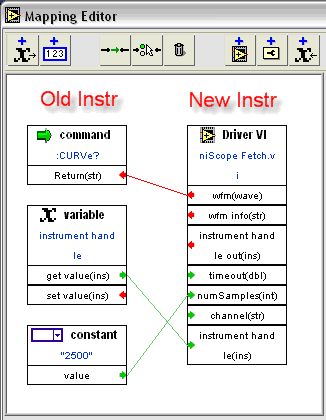
We came up with an editor to map commands to VIs. With this editor, you don't have to edit the XML directly. Here's a screenshot showing the CURVe? command for a scope...


When the system is running, the display shows a log of all the commands and responses... (Click to enlarge.)


So where are we now? The system works. It's got some rough edges—mostly things that could be easier. As a proof of concept, our engineers did a wonderful job. It's pretty cool to watch this system in action. But, we're waiting for customers to tell us whether and how we should take the idea further.


The biggest piece of feedback so far is that customers wish it were more "turnkey". It's one thing to emulate the command set of an aging instrument. It's another to faithfully emulate measurements. Our PXI-4070 6 1/2 digit DMM is faster and more accurate than many older box-based 6 1/2 digit DMMs. But you usually would rather have equivalent accuracy, not more accuracy. A faster and more accurate measurement could be a problem in some test systems.


I also want to point out that more turnkey solutions are available. WinSoft (a National Instruments Alliance Partner and Agilent Channel Partner) has a product called WinSoft Instrument System Emulator (WISE). I do not have experience with their products, but I know they have years of real-world experience.


If you've got thoughts on our instrument emulation project, please let me know.


Read more of this article...

Friday, October 06, 2006

The Spy Among Us -- Debugging I/O

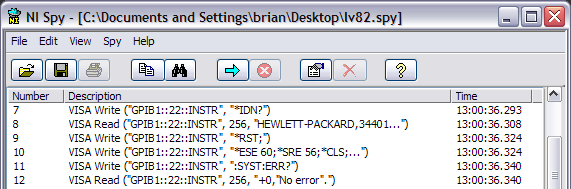
Have you used NI Spy? It's one of our software tools for helping you see and understand the messages sent to instruments. It's especially useful for seeing the low-level SCPI commands sent to Serial, GPIB, or LAN instruments...

NI-Spy Log


It's useful for debugging, optimizing, or just learning more about instrumentation.


NI Spy only works when using NI Software. For example, you'll only see VISA calls if you use NI-VISA, and you'll only see GPIB calls if you use NI-488.2. (Spy also works for NI's Modular Instrument drivers, NI-CAN, NI-DeviceNet, NI's IVI Class Drivers, and maybe some other drivers I'm forgetting.)


I want to be clear that Spy is not a hardware bus analyzer. We sell a GPIB Bus Analyzer for really low-level debugging, but most users can get by with NI Spy.


I find NI Spy especially useful when I run into problems with an instrument driver. If I have a LabVIEW source code driver, I can sometimes go into it and figure out what we're sending to the instrument. But the strings we send to instruments aren't usually constants; usually some part of the string is computed. If I want to know what we really sent to the instrument, NI Spy can show me. Obviously, if you don't have LabVIEW source code to look through, NI Spy may be your only choice.


For example, I have a C-based driver for talking to the Agilent 34401A DMM. It works fine with this DMM. My problems started when I used a different instrument that could pretend to be the Agilent 34401A. There was actually a bug in the C driver that caused it to send an invalid command. The real 34401A didn't care, but the emulation mode of this second instrument failed.


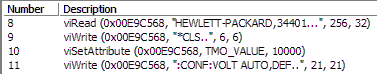
With NI Spy, I can see the actual SCPI command sent to the instrument...


Here I can see that we're sending ":CONF:VOLT AUTO,DEF". If I go look at the official 34401A command reference, I see that the syntax is supposed to be ":CONF:VOLT DEF,DEF". The "AUTO" is wrong.


I had the C source code to the driver, so I tried to find the mistake in the source. It wasn't entirely obvious. Searching for "VOLT" or "AUTO,DEF" doesn't work. Here's the snippet of code that's wrong...

        /*  Configure the measurement  */
if (autorange == VI_ON)
Fmt (wrtBuf, "%s<:CONF:%s AUTO,%s\r\n", funcStr[func], resolStr[resol]);

Without NI Spy, it would have taken me even longer to solve the problem.


By the way, I reported the problem to both the provider of the C driver, as well as to the provider of the instrument emulator.


Finally, I want to highlight a few features we added in LabVIEW 8...


  • NI Spy was ported to Linux and Mac. (It was originally written in MFC for Windows. The Spy team rewrote it in LabVIEW to port it to these other platforms.)
  • The logged calls make more sense for LabVIEW users. Before LabVIEW 8, you only saw the NI-488.2 or NI-VISA C-language calls. Here's the log from a simple write followed by a read...

    While this gives you some insight into how LabVIEW calls NI-VISA under the hood, it's not always easy to map this to your block diagram. Note that I hid six hundred calls to viWaitOnEvent as we waited for the I/O to complete. So in LabVIEW 8, the output looks like this...

    This is from a slightly different driver, but you see the idea. The function names match your diagram, and you don't have to look at the C-language calls.
  • In LabVIEW 8.2, we did the same sort of simplification for the GPIB functions in LabVIEW. You see functions such as "GPIB Read", not "ibrda".


There are a lot of other features of NI Spy that I won't go into here. You can track instrument calls from multiple threads and processes. You can see timestamps to help debug tricky timing situations. It's an indispensable tool for users and developers of instrument drivers.


Read more of this article...