Tuesday, June 12, 2007

Expanding Scope

I returned recently from a couple of trips lamenting that I haven't been keeping this blog current. I was visiting customers in Massachusetts, Connecticut, and Colorado, discussing topics ranging from "performance optimization" to "software engineering". It occurred to me that my blog's current focus isn't keeping up with my everyday work life.


I spend a lot of my day at NI working on "next year's LabVIEW". It's cool stuff. You'll like it. But it doesn't produce much fodder for my blog, because I can't talk about specifics yet. Also, my current project is pretty far-reaching, and doesn't fit neatly into just "data acquisition and instrument control".


So, I'm going to start expanding the scope of my blog a little to cover a few more topics that I care about—and that many of you have told me that you care about, too.


Coming soon... The first of several postings about performance issues. If you have other LabVIEW-related topics you'd like me to cover, please post a comment or send an email.


Read more of this article...

Friday, April 20, 2007

A Good Cause

Today's the day I leave for the MS-150, a two-day, 180-mile bike ride from Houston to Austin, Texas. I'll be riding along with 12,000 other friends and strangers to raise money for the National Multiple Sclerosis Society. This is my third year to do the ride.


Am I ready? Hmm. I'm not sure I can ever be "ready" for a 180-mile bike ride. It is definitely hard. It's also fun to be doing this with nearly a hundred of my co-workers. And I take pride in my own personal accomplishment, as well as being able to help the National MS Society.


My goal is to raise $1500 for the society. The National MS Society is a 501(c)(3) organization, so your donation may be tax deductible. Your donation benefits thousands of people affected by multiple sclerosis. You can donate online here...
http://ms150.org/edon.cfm?id=190138


You can learn more about the society, about multiple sclerosis, and about the bike ride here...
http://ms150.org/ms150/about_ms_society.cfm

Read more of this article...

Monday, February 19, 2007

La Mort du Serpdrv

A series of "interesting" events have conspired to keep me away from my blog lately, so I decided to write about something "juicy" to start things back up. (Where "juicy" means "controversial for people who have been using LabVIEW for more than five or so years". ;-)


Today's topic is about an entity named "serpdrv", mentioned in an earlier post. This entity provided serial (RS-232) support for LabVIEW 2.5 through LabVIEW 6.x. In LabVIEW 7, I arranged for its demise. This posting will talk a little about how it came into existence, and how it made its exit. You'll hopefully gain some insight into how we reach the decision to phase out aging features.


In January of 2002, I posted a message to the Info-LabVIEW mailing list to help a LabVIEW user solve a problem with his serial I/O. Near the end of my posting, I inserted the following text...


I will again encourage people to use VISA for all future serial port development. At some point, I would like to see the "serpdrv" VIs go away. (And since I'm the decision-maker on this, it'll probably happen. :-)

And thus began an outpouring of support for this little thing we call "serpdrv".


It's also the day that I started an internal document called "La Mort du Serpdrv", to start my plan to remove "serpdrv" from LabVIEW. You can construe the existence of this document a couple of ways. Some might consider it our battle plan to kill off the feature. I personally considered it a place to gather user feedback, document shortcomings and features of serpdrv, and come up with a plan to strengthen our other options for serial I/O so that removing serpdrv would be easier.


The Birth of Serpdrv


LabVIEW 1 and 2, as many of you recall, were only available on the Apple Macintosh. Macs had RS-422 serial ports, disguised as the "modem" and "printer" ports. They were quirky not only from a hardware perspective, but also from software. On the old Macs, you used the "Device Manager" to talk to the serial drivers named ".Ain", ".Aout", ".Bin", and ".Bout". Inside Macintosh described the data structures for the driver and how to get the serial port to do all the right things.


In LabVIEW, we created some low-level primitives for this Macintosh Device Manager. We then built the serial VIs on top of the Device Manager primitives. (And as I recall, we built GPIB and DAQ VIs on top of those same Device Manager primitives to get to our own devices.)


When we ported LabVIEW to Windows and SunOS, we needed to invent a cross-platform approach to serial I/O. Every platform did something completely different, so we made a decision not unlike many other decisions of the day: Let's make everything look like a Mac.


So, we invented a Device Manager for LabVIEW for Windows and Sun that looked like the Apple Device Manager. Then we intented Macintosh-like "drivers" that plugged into our new proprietary device manager. Constrained by the Windows 8.3 filenaming conventions of the day, we used the names "serpdrv", "gpibdrv", and "daqdrv" for those low-level drivers.


And that's how things stayed for the next several years. Our GPIB and DAQ support eventually switched to more modern technology. Serpdrv, however, remained. We'd fix the occasional bug, but the overall structure of serpdrv stayed the same.


And Then There Was VISA...


Around the time of LabVIEW 4.1 and 5.0, NI-VISA came into existence. Among other things, VISA could read and write to serial ports and the GPIB. At first, it wasn't as good at serial I/O as "serpdrv", and it wasn't as good at GPIB as our NI-488.2 driver. What VISA had going for it is that it was a combined API layer that made serial and GPIB devices look nearly the same. Since many hardware devices had both GPIB and RS-232 options, we could write a single instrument driver with VISA, and it would work regardless of the I/O option in the device. (And the benefit continues to this day with USB- and LAN-based instruments.)


Around the LabVIEW 5 and 6 timeframe, I became the manager of the part of LabVIEW that was responsible for all the forms of I/O. Among many other things, I was responsible for "serpdrv", and I was responsible for ensuring that VISA worked well in LabVIEW.


Even then, "serpdrv" was legacy code that only one person (not me) really understood. I remember investigating a problem where hardware flow control didn't work. The code to handle flow control clearly didn't match what Microsoft said it should. So I changed it. But that broke something else. This is where I start to question whether we need two ways to do serial I/O in LabVIEW.


Making VISA better


So I put out a challenge to the VISA group... "Remove the barriers that keep VISA from replacing serpdrv."


VISA already had a lot of things going for it. It was a better API for LabVIEW. It had more features, such as control over individual hardware lines. It also had fewer bugs—for example, hardware flow control worked. On the other hand, it was slower and bigger.


The NI-VISA group responded to the challenge. The speed problems were caused by extra threading overhead in the driver. It didn't take long for VISA to be faster than "serpdrv" for serial I/O. They also created a small VISA serial runtime that the LabVIEW Application Builder could use for deployment. It wasn't as tiny as "serpdrv", but it was a big improvement over the tens-of-megabytes for the full VISA driver. And then we had to work through some VISA licensing issues so that LabVIEW users could freely distribute applications that used the VISA serial runtime.


What our customers didn't see was a lot of internal discussion and angst. Besides feedback from external customers, we also had feedback from our own FieldPoint group. They had industrial controllers with very limited processing and memory capability. Switching to VISA was a bigger deal for them than for most of our external customers.


And "serpdrv" disappears...


By LabVIEW 7, VISA had improved and I decided that we could proclaim that it was good enough that we could deprecate "serpdrv". We created a set of compatibility VIs that presented the old API, but it was built on top of the VISA functions. Many people did not notice. Some did, leading to another round of commentary on Info-LabVIEW.


It didn't take long for somebody to figure out that the old "serpdrv" VIs would still work in LabVIEW 7. This gives our customers an "out" if they absolutely don't want to use VISA for serial I/O. While not supported (or even tested), they should still work in LabVIEW 8.x, too. That's because the mysterious Device Manager primitives are still in LabVIEW. But that won't always be the case, and I can announce to you today that we'll remove the Device Manager interface in a future version of LabVIEW. I don't know when, but it's going to happen.


Moving on...


So I want you to realize that we do agonize over changes like this. Before we started, VISA was in many ways superior to the old serial VIs. Not satisfied, we put in a substantial amount of additional effort to make it better still. I still look back over my shoulder to see if I've missed something, but I'm confident that "serpdrv" won't be coming back.


Read more of this article...

Friday, December 29, 2006

Using IVI-C and VXIpnp Drivers in LabVIEW

Happy end of 2006 to everybody out there.


In earlier posts, I've talked about the various kinds of instrument drivers. All of the modern types of instrument drivers work reasonably well in LabVIEW, but some work better than others. Specifically, LabVIEW Plug and Play instrument drivers (written in native LabVIEW source code) give LabVIEW users the best experience.


But not all instrument drivers are written in LabVIEW. This post talks about instrument drivers written in C, and how to bring them into the LabVIEW environment. C is considered a kind of "universal language"; C compilers are available for a huge number of platforms. So, vendors whose mission is to write a single driver that is usable on many platforms in many different environments often write a driver in C. (Though a reminder from an earlier post, the one-size-fits-all instrument driver isn't a particularly good idea.)


The first step in using a C-based driver in LabVIEW is to turn the C code into a DLL or Shared Library. Often, the person who wrote the driver does this for you, at least for Microsoft Windows. How to compile the driver is left as an exercise for the reader. My focus is on making the resulting shared library usable in LabVIEW.


To use a shared library (DLL) in LabVIEW, you use the Call Library Node (CLN) function on the diagram. You configure a CLN for every function you want to call. Typically, you create a single VI for each C function, and then use these VIs in higher-level diagrams. (Click to enlarge)


As you can imagine, if you have a shared library with dozens or hundreds of entry points, it can be tedious to make these VI wrappers. Fortunately, we have tools to make this easier.


Kinds of C-based Instrument Drivers


Broadly speaking, there are three different kinds of C-based instrument drivers...


  • Drivers that do not conform to VXIpnp standards

  • Drivers that conform only to VXIpnp standards

  • Drivers that conform to both VXIpnp and IVI-C standards


The more standards a C-based driver conforms to, the more we know about how it is structured. The more we know about it, the better job we can do pulling the driver into the LabVIEW environment.


For drivers that don't conform to VXIpnp, we can't make any assumptions at all. We see this more often with somewhat esoteric instruments, or instruments from industries other than traditional test & measurement.


For VXIpnp drivers, we know they have an Initialize, a Close, a certain form of error checking, and a few other details. We don't know anything about instrument-specific functionality, such as whether a device is a DMM, a Scope, or something else.


IVI-C drivers go a step further, and define more of the API, at least for certain classes of instruments (such as DMMs, Scopes, Switches, etc.). This lets us more intelligently bring these drivers into the LabVIEW environment.


Tools for Importing


There are two separate LabVIEW tools you can use to help import these drivers. The first is the DLL Import Wizard, for importing generic (not VXIpnp or IVI-C) DLLs. The NI web site has a tutorial about this tool, so I won't go into much detail about it here.


If you have a VXIpnp or IVI-C driver, you want to use a different tool—the LabVIEW Instrument Driver Import Wizard, found on Instrument Driver Development Tools and Resources page on ni.com.


Unlike the generic DLL Import Wizard, the Instrument Driver Import Wizard is able to use its knowledge of the VXIpnp and IVI-C standards to create better wrapper VIs. It even makes an attempt to translate the C terminology in the help to LabVIEW terminology. Here's an example, showing the original C help and the translation into LabVIEW terminology...(Click to enlarge)


The Instrument Driver Import Wizard understands VISA and IVI refnum data types, it knows how the driver does error checking, and it creates better icons. It isn't perfect—there's a very good chance that you will want to tweak some of the resulting VIs to improve front panel layout, connector panes, and help. You may also want to clean up parameters to make them easier to use in LabVIEW—for example, integers that represent bitfields that you are supposed to "OR" together. But, the Instrument Driver Import Wizard handles a lot of the conversion for you.


If it isn't obvious... If you have a VXIpnp or IVI-C driver, you use the Import Instrument Driver Wizard, not the Generic DLL Import Wizard.


Final Caveats


The Instrument Driver Import Wizard used to be called the "CVI Function Panel Converter" and we shipped it with LabVIEW. Beginning with LabVIEW 8, we made it a web download. Some instrument vendors complained about this. They were claiming good LabVIEW support for their C-based drivers, but telling end users to go run the tool themselves to create the LabVIEW VIs.


My philosophy is that most end users don't need to run this tool. In an ideal world, the developer of the C instrument driver should be the one to run the LabVIEW Instrument Driver Import Wizard. Since the output of the tool often needs some tweaking (or even fixes to the C code), I'd prefer that only one person (the driver developer) create the wrapper. If every end user has to create the wrapper VIs, and then go hand-tweak them, it isn't very efficient. Many end users aren't going to understand the C driver well enough to make these changes easily.


Another caveat is that these tools only run on Windows. Fortunately, the resulting VIs can run on any LabVIEW platform (assuming you can recompile the DLL on the other platforms). Many VXIpnp drivers can run on multiple platforms. Interestingly, members of the IVI Foundation have told me that conformant IVI drivers can only run on Microsoft Windows. So even though we have instructions for porting IVI-C drivers to Linux, the Linux driver may not officially be an IVI driver. Regardless, the wrappers you create for LabVIEW should work with such a driver.


Read more of this article...

Tuesday, December 05, 2006

LabVIEW API Design

Sorry it's been a while since my last post. I've been traveling, most recently to New Mexico and Colorado for National Instruments Technical Symposia, and a little bit of photography at the Bosque del Apache National Wildlife Refuge.

In my role at National Instruments, I work with many of the driver and toolkit groups that provide LabVIEW APIs for their products. We make decisions about how to best represent our products in easy to learn and easy to use ways.


We're often faced with difficult tradeoffs, and some decisions come down to a "gut feel" by those of us involved. I thought I'd share some of the thought process that goes into making a good API for LabVIEW.


First, a little history. Many of you have attended, or at least heard of, NIWeek—Thousands of users, dozens of presentations, dozens of exhibitors. Did you know that we have a similar NI-only event called "NITech"? This is where NI R&D sets aside three days to have NI engineers present to other other NI engineers. We learn about the latest hardware and software technologies, ongoing research ideas, and good development practices. (And just as at NIWeek, we have fun, too.)


At NITech 2001, I co-presented a session on "Why Good Hardware APIs are Different in LabVIEW, CVI, VB, and VC". Each development environment is different. Some differences are radical, such as LabVIEW's data flow approach vs. text languages that are control flow. Some are as simple as the differences in the online help systems, or the fact that LabVIEW APIs have icons in addition to function names. One conclusion of the presentation is that it's worth it to fine-tune an API for the development environment your users are going to use.


For NITech 2002, I expanded the presentation and called it "Good LabVIEW API Design". I moved it out into the open at NIWeek 2003, where I updated it and called it "Developing High Quality LabVIEW Add-ons". For NIWeek 2004, I updated it once again, and put some spin on the name—"Advanced LabVIEW Design—Usability, Reusability, and Maintainability".


Some of the ideas from those presentations have been incorporated into either the LabVIEW Development Guidelines (available in the LabVIEW help), or the Instrument Driver Development Guidelines. I don't plan to rehash every guideline here, but there are a few ideas from the presentations I'd like to cover from time to time.


At a recent LXI meeting, I was asked whether it made sense for IVI-COM drivers to have LabVIEW VI wrappers around them. That is, instead of having users use the IVI-COM drivers as COM objects directly in LabVIEW, should he create a VI for every property and method in the driver? As with so many things, the answer is, "it depends".


When someone asks, "should I do it this way?", you have to step back and consider the alternatives. There's not necesssarily one perfect way.


A few years ago, one of the well-known instrument vendors developed LabVIEW instrument drivers that consisted of hundreds of VIs. Basically, they had one VI per SCPI command. In a scope API, you called one VI to set coupling, and another to set vertical range, and another for vertical offset. In my book, this was pretty low-level tedious programming. It was also error-prone—some instruments, for example, have a particular order in which you need to send the commands.


I've argued that users really want a higher-level instrument driver—"configure channel" or "configure vertical", not the lower-level components. Let the author of the instrument driver figure out the programming details once, instead of pushing that onto each user. Still, some vendors really like the low-level approach, since it's so powerful and so granular. I think users who want such a low-level approach can use VISA Write to send their own SCPI commands.


Let me restate this to make the tradeoffs clearer. Approach 1 is to have hundreds of simple VIs that consist mostly of VISA Write calls. The driver covers every command the instrument can handle. Approach 2 is to have only a few more complex, higher-level VIs that are commonly used. If you want something more granular, you either modify one of the existing VIs, or you create your own new VI with a VISA Write in it.


I generally lean towards approach 2. The first approach is often overwhelming, and users don't know where to start and how to put the pieces together.


The IVI APIs presented some new challenges. They're more complex, and it's not as simple to insert a VISA Write in your code to tweak a specific setting. So the IVI-C APIs have a few high-level methods, and hundreds of low-level properties. When we designed the first IVI-C APIs for the various instrument classes, we tried to make it so that 80% of typical user applications could be accomplished with only the higher-level methods.


The palette menus for an IVI-C driver in LabVIEW expose the high-level functions. We often also include a single property node to make it easy to get to the rest of the API. Thus, the palettes lead you to the right starting place for the API.


The same idea could map to IVI-COM. Unfortunately, IVI-COM drivers do not always expose a high-level approach in the specific driver interface. Recall from my earlier post about IVI-C and IVI-COM, that the specific interface to an IVI-COM driver doesn't conform to any standard.


So, since I don't know anything about the structure of the API, I can't recommend creating LabVIEW wrappers around it. And because I know that most IVI-COM specific interfaces use a low-level, property-centric approach, I usually actively discourage creating wrapper VIs. The end user is going to have to explore the entire API to figure out how to put it together in an application. Fortunately, the LabVIEW Class Browser (under the View menu, and new in 8.0, I think), makes it somewhat easier to explore IVI-COM drivers.


On the other hand, if you have a well-designed API that has easy-to-use high-level functions, it makes sense to highlight those in the palette menus and lead users to them.


More on API design in future posts.


Read more of this article...

Monday, October 30, 2006

Emulating Legacy Instruments

This is a story of one of the projects we have in the lab. It's an experiment and proof of concept. At this point, we aren't committed to creating a product out of this idea. I'm interested in hearing comments you have about it. We presented a paper about it at AutoTestCon a couple of years ago, and I've demo'd the system to a few key customers.


We have customers who have aging test systems, often based on discontinued GPIB instrumentation. There's often no money to update the overall system. Changing out hardware usually implies modifying the software. The software has often gone through some sort of validation process, so any change to the software can become extremely expensive since it would have to be revalidated.


If an instrument fails, the engineers can either hope for vast amounts of money to rebuild the entire test system with modern hardware, or they can try to repair or replace the old equipment. eBay has become a useful tool for finding old instrumentation.


So our experiment was to take a modern PXI-based measurement system, and make it pretend to be a GPIB instrument. The PXI controller listens for commands on its built-in GPIB interface. We wrote software that parses those commands and maps them to specific LabVIEW VIs running on the controller. Responses are sent back out the GPIB interface.


I imposed a couple of requirements to make things interesting...


  • The system had to be as generic as possible. I didn't want to encode any traits of a DMM or Scope or Spectrum Analyzer into the system. For this, we created an XML schema to define the commands that the system understands, as well as how those commands map to VI calls.

  • The system had to be extensible by end users using LabVIEW. We aren't making turnkey instrument replacements; we're making a framework for end users. This lets end users (or system integrators) control the fidelity of their emulation. This might range from deriving custom measurements, to slowing down measurements to more accurately emulate legacy instrumentation.


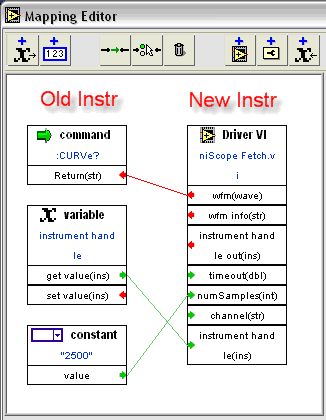
We came up with an editor to map commands to VIs. With this editor, you don't have to edit the XML directly. Here's a screenshot showing the CURVe? command for a scope...


When the system is running, the display shows a log of all the commands and responses... (Click to enlarge.)


So where are we now? The system works. It's got some rough edges—mostly things that could be easier. As a proof of concept, our engineers did a wonderful job. It's pretty cool to watch this system in action. But, we're waiting for customers to tell us whether and how we should take the idea further.


The biggest piece of feedback so far is that customers wish it were more "turnkey". It's one thing to emulate the command set of an aging instrument. It's another to faithfully emulate measurements. Our PXI-4070 6 1/2 digit DMM is faster and more accurate than many older box-based 6 1/2 digit DMMs. But you usually would rather have equivalent accuracy, not more accuracy. A faster and more accurate measurement could be a problem in some test systems.


I also want to point out that more turnkey solutions are available. WinSoft (a National Instruments Alliance Partner and Agilent Channel Partner) has a product called WinSoft Instrument System Emulator (WISE). I do not have experience with their products, but I know they have years of real-world experience.


If you've got thoughts on our instrument emulation project, please let me know.


Read more of this article...

Wednesday, October 25, 2006

LAN Is Simple, Right?

I was in the Boston area last week at the latest LXI Consortium meeting. We spent some time the first day putting together our "lessons learned" from building a multi-vendor Ethernet-based test system. To no one's surprise, we had a couple of pages of feedback. One of the most prominent points was that the demo took three to four times the amount of effort we expected. I haven't crunched the exact numbers, but our one team-week turned into several, including some near all-night sessions. Our "team" consisted of experts from Agilent, Rohde & Schwarz, VXI Technologies, National Instruments, and others.


I'm sure those of you who build test systems for a living are laughing at us. You would have wisely planned for the extra effort, despite (or perhaps because of) the fact that we were using LAN instead of GPIB, PXI, or some other more traditional instrumentation bus.


And you'd be right to laugh at us. I think we were a little naïve.


Speaking of naïve, I had my own "IT issues" on my home network over the weekend. The parallels to an LXI system are striking...


I had a simple problem I wanted to solve: I needed more disk space.


As many of you know, one of my creative outlets is photography. Before the LXI meeting, I was in Vermont for a photo workshop with David Middleton and Rod Barbee. I brought home several gigabytes of digital images.


I've been making backups on DVDs, but they aren't very archival, and I need a lot of them to hold my images. I could have bought a simple internal or USB hard drive and been happy. But no! I had to go for a RAID network attached storage device.


In theory, this is a simple solution. The storage device is a simple device with a LAN interface. It automatically works out the network connection. There's a simple tool for discovering the device on the network, and it has a web server built in to let you configure various options. Sounds like LXI, doesn't it?


You've probably surmised by now that something went wrong. To make a long story shorter, it turns out that my new network storage device is incompatible with my network router. Both the network router and storage device are from respected companies, but somehow they started fighting over the network.


I "solved" the problem by buying a new wireless+100-Base-T $30 router. I looked at the gigabit ethernet routers, but they're about 5X the cost. Yikes!


The new router has a simple "getting started" utility, and you configure it through its web server. Sound familiar? It only took me a few tries to get it to work wired, but I'm still struggling with the wireless security.


Ethernet is just supposed to work! When I bought my storage device, I couldn't have conceived of all these hassles. I didn't budget for the extra time and equipment. Recall that I was a network administrator at an earlier point in my NI career, so I consider myself a little more savvy than most network users. Besides, I just helped build an expensive LXI test system! How hard can it be to add a storage device to my home network?


I'm up and hobbling right now, but I can't help thinking about how simple it would have been to plug in a simple USB device.


Read more of this article...

Tuesday, October 10, 2006

A Geek Hotel

Yeah, "Geek", not "Greek". I must be staying in the geekiest hotel on the planet.


I have no desire to take a Geek Cruise, and I scored unsurprisingly low on the Geek Test*, but I did willingly choose to stay at the Hotel@MIT. I was attracted to the hotel because of its location and promise of good internet connectivity.


I was expecting the modern decor of the lobby, and not entirely surprised by an exhibit of historical MIT robots in the lobby. I failed to expect the bedspreads...


Now don't get me wrong. This is a really nice hotel, close to the red line, and for those needing a deeper geek fix, the MIT Museum.


* As a team-building exercise (okay, it was really just a diversion from work), my part of the LabVIEW group took the geek test. The highest score was by a woman who got points for having designed a nuclear device in college.


Read more of this article...

Friday, October 06, 2006

The Spy Among Us -- Debugging I/O

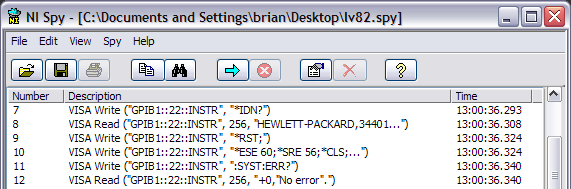
Have you used NI Spy? It's one of our software tools for helping you see and understand the messages sent to instruments. It's especially useful for seeing the low-level SCPI commands sent to Serial, GPIB, or LAN instruments...

NI-Spy Log


It's useful for debugging, optimizing, or just learning more about instrumentation.


NI Spy only works when using NI Software. For example, you'll only see VISA calls if you use NI-VISA, and you'll only see GPIB calls if you use NI-488.2. (Spy also works for NI's Modular Instrument drivers, NI-CAN, NI-DeviceNet, NI's IVI Class Drivers, and maybe some other drivers I'm forgetting.)


I want to be clear that Spy is not a hardware bus analyzer. We sell a GPIB Bus Analyzer for really low-level debugging, but most users can get by with NI Spy.


I find NI Spy especially useful when I run into problems with an instrument driver. If I have a LabVIEW source code driver, I can sometimes go into it and figure out what we're sending to the instrument. But the strings we send to instruments aren't usually constants; usually some part of the string is computed. If I want to know what we really sent to the instrument, NI Spy can show me. Obviously, if you don't have LabVIEW source code to look through, NI Spy may be your only choice.


For example, I have a C-based driver for talking to the Agilent 34401A DMM. It works fine with this DMM. My problems started when I used a different instrument that could pretend to be the Agilent 34401A. There was actually a bug in the C driver that caused it to send an invalid command. The real 34401A didn't care, but the emulation mode of this second instrument failed.


With NI Spy, I can see the actual SCPI command sent to the instrument...


Here I can see that we're sending ":CONF:VOLT AUTO,DEF". If I go look at the official 34401A command reference, I see that the syntax is supposed to be ":CONF:VOLT DEF,DEF". The "AUTO" is wrong.


I had the C source code to the driver, so I tried to find the mistake in the source. It wasn't entirely obvious. Searching for "VOLT" or "AUTO,DEF" doesn't work. Here's the snippet of code that's wrong...

        /*  Configure the measurement  */
if (autorange == VI_ON)
Fmt (wrtBuf, "%s<:CONF:%s AUTO,%s\r\n", funcStr[func], resolStr[resol]);

Without NI Spy, it would have taken me even longer to solve the problem.


By the way, I reported the problem to both the provider of the C driver, as well as to the provider of the instrument emulator.


Finally, I want to highlight a few features we added in LabVIEW 8...


  • NI Spy was ported to Linux and Mac. (It was originally written in MFC for Windows. The Spy team rewrote it in LabVIEW to port it to these other platforms.)
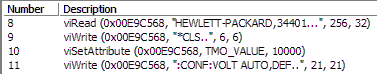
  • The logged calls make more sense for LabVIEW users. Before LabVIEW 8, you only saw the NI-488.2 or NI-VISA C-language calls. Here's the log from a simple write followed by a read...

    While this gives you some insight into how LabVIEW calls NI-VISA under the hood, it's not always easy to map this to your block diagram. Note that I hid six hundred calls to viWaitOnEvent as we waited for the I/O to complete. So in LabVIEW 8, the output looks like this...

    This is from a slightly different driver, but you see the idea. The function names match your diagram, and you don't have to look at the C-language calls.
  • In LabVIEW 8.2, we did the same sort of simplification for the GPIB functions in LabVIEW. You see functions such as "GPIB Read", not "ibrda".


There are a lot of other features of NI Spy that I won't go into here. You can track instrument calls from multiple threads and processes. You can see timestamps to help debug tricky timing situations. It's an indispensable tool for users and developers of instrument drivers.


Read more of this article...

Sunday, October 01, 2006

Instrument Drivers and the LabVIEW Community

Sorry it's been a couple of weeks since my last posting. I've been on vacation in the Big Bend area of Texas. It's a beautiful part of the state, and here's a taste for those of you who've never been there...


Agave HavardianaThis is an Agave Havardiana in the Chisos Basin in the central part of the park. (Image Copyright © 2006 Brian H. Powell. All Rights Reserved.)


This area is a long way from, well, anywhere. Not a lot of people live here on either side of the border. There are a few small towns, such as Terlingua and Marfa. These places have developed a strong sense of community. We went to the community theater in Terlingua on the opening night of a three-night run. Most of the town was there in the un-air-conditioned building, with a few dozen plastic lawn chairs for the audience. And we were most welcome. It didn't matter that we were only staying a few days; we were part of the community. People look after each other out here.


And that's why it's great to have a LabVIEW community. While it's good to know that you can contact NI and get technical support, we have the tremendous privilege of having a community of amazingly smart and experienced users around us. If you spend much time on the NI Discussion Forums, you know of helpful contributors such as Dennis Knutson, Christophe Altenbach, Albert Geven, and many others.


There are many other parts of the community...


These groups foster the sharing of ideas, techniques, and code. Sorry if I left out your favorite site.


Like every community, these places are only useful as long as people participate. If nobody is willing to get on stage, it's not going to be much of a play.


There's one important part of the LabVIEW community I want to highlight, and I want to encourage you to contribute to it. It's the Instrument Driver Network (IDNet). Have you ever noticed the button that says, "Submit Drivers"? It's a way for people to share their instrument drivers back to the LabVIEW community.


We have instrument drivers for thousands of instruments on IDNet, but there's room for more. We write a lot of the drivers ourselves, but only if we can get an instrument in-house to work with. We don't have easy access to older instruments, or obscure or expensive instruments. When you can't find an instrument driver for your instrument on IDNet, you can always try posting a query on the Discussion Forums to see if someone else has done it. Failing that, you may end up having to write your own driver.


When that happens, I encourage you to submit your driver back to IDNet, so we can share it with the rest of the LabVIEW community. You could save somebody a lot of time.


And I encourage you to do this even if you've only written a few VIs and haven't done a full-fledged instrument driver. If you needed only a few functions, the next user may also need only those same functions. Regardless, it's easier for the next user to start from your code instead of starting from nothing.


When you submit your driver, we'll take a look at it before posting it. We'd obviously enjoy receiving a complete, tested driver that conforms to our guidelines, so that we can certify it, but we can post "un-certified" drivers, too. (More on certification in a future post.)


So next time you're writing some VIs to talk to an instrument, support your community and volunteer to go up on stage.


Read more of this article...