Monday, September 13, 2010

Agilent’s Endorsement of PXI

At IEEE AUTOTESTCON today, Agilent announced the release of 43 PXI devices, their strongest commitment to PXI to date.

This is a great endorsement for modular instrumentation on the PXI platform.  It’s also an acknowledgement that no single instrumentation bus is perfect for every test scenario.

As a software guy, I was especially pleased to see this comment in the EE Times product review

Software and I/O is not an afterthought for high-performance instruments, but an integral part of the system-level execution that users must implement. […] Each module also includes drivers which are specific to the operating environment: IVI-C, IVI-COM, and [LabVIEW] G, with context-sensitive help…

As I’ve said in earlier posts, no single driver technology works well in all development environments.  So I’m pleased to see that every Agilent PXI module includes drivers for several different development environments—IVI-C for C/C++ users, IVI-COM for Microsoft COM languages, and LabVIEW drivers for LabVIEW users.

I have not yet seen the LabVIEW drivers for Agilent’s PXI modules, but I’m anxious to see what they look like, and see how well they work in the LabVIEW environment.  Stay tuned.

Read more of this article...

Tuesday, June 01, 2010

GPIB vs. LAN for Instrumentation (2010 Update)

I got an email a friend last week, with this simple question...

"What's your take on reliability of programming [Brand A's] instruments via Ethernet & GPIB?"

This friend is a Certified LabVIEW Architect, and designs and implements a variety of test and measurement applications for her customers.

She's also one of my best friends, and her livelihood depends on my honest advice.

Here's what I told her...


1) GPIB just works. It's proven itself reliable and robust over a few decades.


2) LAN, I think, can be reliable, too. It's proven technology, obviously.


3) You'd want to put some thought into the network architecture. For example, I'd probably want to find a good network hub, and configure static IP addresses on the computer and all the instruments.


4) Does the host computer have to also be on a corporate network? If so, I'd have two network cards in the computer--one for the corporate network, and one for the instrumentation. In this case, I would probably ask corporate IT if they want to advise on any network settings/requirements they would like to see, since the computer is acting as a router in this case.


5) Related to #4, are there any security requirements to be aware of? E.g., would you need to block access from the rest of the internet trying to access your instruments? It can be done, but you have to know to set it up.


6) Is performance a concern? What kind of traffic is going on between instruments and the computer? LAN is faster for bulk data transfer. GPIB is faster for small, simple readings.


7) LAN allows for some interesting possibilities for network synchronization, web access, long distances between devices, and other features. If you think you need those, we can talk further.


Summary: Both work. If GPIB is sufficient for your application, I'd be inclined to start there as a path of least resistance. But I wouldn't be afraid to use LAN; I'd just go in expecting it to be a little more complicated.

Read more of this article...

Tuesday, February 10, 2009

A Short Robot Video

In my last post, I talked about the instrument driver for a Hokuyo LIDAR that I've been working with. The new driver that supports more models (and supports them all better) will be posted to IDNet in the next week or two.

I thought I'd show you how I was actually using the LIDAR. Meet NIcholas, a robot I've been working with for the last few weeks...

NIcholas is based on a radio-controlled car platform, but is controlled entirely by the on-board single-board RIO computer running LabVIEW Real-Time and LabVIEW FPGA.

Single-board RIO is an OEM-able circuit board that contains both LabVIEW Real-time and LabVIEW FPGA targets. It's similar in functionality to the compactRIO platform. I'm using the Real-time part for processing the LIDAR data, and the FPGA for controlling the motors and steering.

I didn't build NIcholas myself; he was built by an intern last summer. As a research project, I've taken him under my wing for a while to learn more about LabVIEW on the RIO platform, and a little bit about robotics.

NIcholas doesn't have much of a mission, yet. He just drives around autonomously and tries to avoid obstacles. The LIDAR is used to detect obstacles and find the clearest path to take.

Here's a short video showing NIcholas in action...

For more information on robotics with LabVIEW, see ni.com/robotics.

Read more of this article...

Friday, December 26, 2008

LabVIEW API Design: A Quick Case Study

Happy holidays, everybody. It's Friday, December 26, and I'm one of a handful of NI Austin employees not taking a vacation today. I got a really good parking spot. :)

A couple of recent blog comments have asked for more thoughts on LabVIEW API design. As it happens, I've been working with a device lately with a LabVIEW instrument driver that I'm not entirely happy with. So I will use this driver as an example to highlight a few points on API design.

To be fair, this driver is actually pretty good. It's a driver for a Hokuyo laser rangefinder, written by one of our interns. I think this is the first driver that we've written for a laser rangefinder, also called a LIDAR. The first driver for a particular type of instrument is hard. (That's why our instrument driver development tools encourage you to start with a driver for a similar instrument if you can.)

I'm revisiting this driver for a couple of reasons... 1) I am trying to extend the driver to support a newer, faster model in the same LIDAR family, and 2) I'm trying to get data from my current LIDAR faster.

If the first driver of a particular type is hard, the second is harder. Once I have two similar, but different, instruments, I have to resolve the differences in a way that makes sense for both devices.

Okay, let's dive into the API...

Not Enough Choices

When Initialize is called, instrument drivers generally query the instrument they are talking to, in order to ensure that it's really the right kind of instrument. Most Initialize functions let you turn this check off, either for performance reasons, or to let you try to use this driver for a different instrument with a compatible set of commands.

Here's the help window for the Hokuyo URG-04LX instrument driver Initialize VI...


There's something missing that just about every instrument driver Initalize function includes--the "ID Query" Boolean input. ("ID" as in "Identification".)

This latter example is what I was trying to do. I had a new model of Hokuyo URG LIDAR that I wanted to talk to. As expected, the instrument driver failed on the Initialize, since the identification string returned from the LIDAR didn't match an expected value.

Why wasn't the ID Query Boolean included on the Initialize VI? I don't know. I can imagine that the author didn't feel confident that the code worked with anything more than the specific hardware he or she tested. But I still would have included the Boolean, to make it easier for end users to try anyway.

Too Many Choices

There's another input on Initialize labelled "Protocol"...

This LIDAR has two slightly different ASCII command sets that it can support--version 1.1 and version 2.0.

How does a user know which to choose? Let's see what the help says for this input...
Hmm. Sounds like 2.0 is better. Why not default to that? Why give the user a choice at all?

I can think of two reasons. First and most importantly, early units of this model of LIDAR had firmware that don't support SCIP 2.0. So, if we assume that SCIP 2.0 is available, this driver wouldn't work with those units. Second, the SCIP 2.0 protocol uses a few more bytes per command than the SCIP 1.1 protocol, and thus might be slightly slower in certain uses.

But I think we should not expose this protocol choice to users. Here's my reasoning... 1) The only users of this LIDAR that we know are using it with LabVIEW have the latest firmware, thus they wouldn't be affected by depending on 2.0. 2) The firmware is field-upgradable, so the user could update the LIDAR to be compatible with the driver. 3) The newer model of LIDAR I'm using only supports the 2.0 protocol, so it's confusing to have the option for 1.1 when it won't work on some devices. 4) The extra bytes for the commands don't seem to have a measurable impact; the measurement time of the instrument appears to be the gating factor on performance. 5) Dropping support for the old command set lets us remove almost half the code in the driver. Most VIs have a case structure for the 1.1 and 2.0 cases. We can now remove those case structures and just leave the 2.0 code inline.

Another couple of minor nit-picks as long as I'm showing you this front panel for Initialize... I would have hidden the digital displays for baud rate and protocol. The menu ring's label says 19200, so I don't need to see that the data value is also 19200. And the protocol data value of "1" is used only internally and doesn't need to be exposed to the user.

Giving Users Choices

I seem to have come up with two contradictory examples about giving users choices. For ID Query, I'm complaining that the API designer didn't give me the choice to turn it off. For the protocol, I'm complaining that the API designer gave me a choice I didn't want to make.

I think it all comes down to a judgement call. What are the chances that someone is going to want to use one of Hokuyo's other models of LIDARs? High, I think. What are the chances that somebody really must use the 1.1 communications protocol. Low, I think.

If the API designer really wanted to support both communications protocols, I would insist that he or she document how to choose between them. Which leads to a related issue in the driver...

Documenting Expected Usage

One of these LIDARs can use serial to communicate. (Both can use USB.) With serial, one of the parameters you have to configure is the baud rate--the communication speed of the device.

Most serial devices use a baud rate configured through either DIP switches, or through a front panel menu that stores the rate in non-volatile storage.

The Hokuyo URG-04LX uses a command sent through the serial port to configure the baud rate for the serial port. This is a classic "chicken and egg" problem. I have to use the serial port to configure the serial port.

When this device powers on, it defaults to 19,200 baud. If I want to transfer data at 115,200 baud, I have to connect at 19,200, then send a command to tell the LIDAR to communicate at 115,200 baud, then change my own connection to 115,200 before continuing the conversation.

Now suppose I finish my program and want to run it again. What should the initial baud rate be? In this case, I have to know that when I reconnect to the device, that it is already configured to 115,200 baud. (Or I have to reset or power-cycle the LIDAR in between programs, to revert to 19,200 baud.)

This can get pretty confusing, which is why my most devices configure their baud rates through physical switches.

Back to the API, there are two places where baud rate can be configured. First is on Initialize, as shown above. As I learned by studying the block diagram of Initialize, this baud rate is used for the initial communications to the instrument.

The second place you configure baud rate is with a configuration VI...


As I learned by studying the block diagram of this VI, it sends a command to the LIDAR to configure its serial baud rate. It does not change the baud rate of the host side.

So I think the expected usage is that you would call Initialize to establish the initial connection, then Configure Serial Baud Rate to increase the LIDAR link speed, and then use a VISA property node to change the host link speed. And I think you have to put in a short delay after that to get things to settle down after the baud rate change on the LIDAR.

Suggestion #1: Document this! Don't make every user have to figure this out on their own. If nothing else, make an example. It may not be a common use case, but if it's non-intuitive, an example or a little bit of documentation can be very helpful.

Suggestion #2: If two steps should always happen together, combine them. I modified the Configure Serial Baud Rate VI to also change the local baud rate and add the delay. That way, the end user doesn't have to remember to do this. I also thought about moving all of this into Initialize (which would take two baud rate inputs--initial, and desired). I voted against this, since there might be a use case where you just want to change the baud rate after you've already initialized.

Making Changes

So what's going to happen to this instrument driver? For myself, I've hacked together an instrument driver that does what I want for my two LIDARs. Now, I'll be asking someone to go back in and make the edits the "right way", now that we know more about what the "right way' is. We'll then feed this update back onto the Instrument Driver Network for others to download and use.

Read more of this article...

Wednesday, November 26, 2008

A Quick Update

I'll be traveling to Albuquerque and Denver next week for the NI Tech Symposia. If you live in New Mexico or Colorado, I hope to see you. (Dec. 2 for Albuquerque, Dec. 4 for Denver.) For more info... http://www.ni.com/seminars/.

I'll be presenting "What's New in LabVIEW 8.6", "Software Engineering Best Practices for LabVIEW", and "Using IEEE-1588, GPS, and IRIG-B for Multi-System Synchronization".

This weekend before the Albuquerque NI Tech Symposium, I'll be making my annual trip to the Bosque del Apache National Wildlife Refuge for some bird photography. Let me know if any of you are hanging out there.


A quick update on our employee giving campaign. (I got a lot of positive feedback on that post, by the way.) In these tough economic times, we managed to increase the total dollars pledged, as well as the number of donors. I am proud that NI employees recognize that non-profits need us now more than ever, and that we were able to step up and help meet those needs. I know of only one other Austin high-tech company that grew their campaign dollars this year.

For me personally, it was an emotionally rewarding experience. I'm glad the "Why me?" of heading the campaign turned into a "Yes".


I've got some more blog posts in my head, and I'll be trying to find the time to get them out.

Read more of this article...

Monday, October 06, 2008

Giving Back To Our Communities

On Friday night, I went to the opening night performance of a local non-profit choral group, Conspirare. They are an amazing, world-class group, and they put on a wonderful show that will soon be recorded by PBS. I even recognized in the audience Dr. Anton Armstrong, conductor of the renowned St. Olaf Choir.

Sitting in the audience, watching and listening to Conspirare, I could not help but think that this is an organization worth supporting. How fortunate we are to have them in Austin.


Today marks the beginning of our three-week employee fall giving campaign, of which I am the chair.

A few weeks ago, I received a mysterious meeting invitation in my inbox... "Quick chat with community relations". I had been warned that I was on the list of candidates to chair this year's campaign, so I knew what the meeting was going to be about. This gave me time to think about it.

At first, it was a "why me?" kind of experience. What was I signing up for? It's overwhelming and intimidating—we've got thousands of employees in the US, and I would be the voice of the campaign.

We've got a pretty good track record of employee giving. High standards, yet the economy is tough this year.

Sigh. I'm not sure I'm the guy for the job. It would be so easy to say no; to push this off on someone else.

But I don't. I won't.

I care about the community in which I live. I care about NI, and feel privileged to work here. I care about the arts. I care about education. I care about animals and the environment. I care about social needs, health needs, literacy needs.

With the consummate support of the National Instruments Community Relations team, especially Yvette Ruiz and Amanda Webster, here I am.


We hire a lot of our employees right out of school. This is great; keeps us young. It also means that some of our employees may not yet feel strong connections to their communities. And this is one of my challenges.

I asked for a field trip. I asked our community relations people if we could organize a field trip for our campaign volunteers.

I wanted our volunteers to see a need firsthand. We have dozens of volunteers, without whom we couldn't run this giving campaign. They go to every group meeting and explain the reasons for the campaign, the goals, and the mechanics.

I wanted our volunteers to see where the money goes, and what it buys, and to be able to talk about it to our employees.

We went to SafePlace, which fights domestic violence and sexual abuse.

A few days later, a different group of NI employees went to Dell Children's Medical Center of Central Texas.

And in the past few weeks, I've been to events for Communities in Schools, and the Austin Lyric Opera.

We've got thousands of non-profits in central Texas, thousands more nationwide, and our employees can choose to whom they donate. I want all of our employees to know that they can make a difference in their communities.


Another theme I want to stress is that any amount helps.

I am truly proud that NI has the largest number of employees who are able to donate $1000 or more to be a part of the United Way Capitol Area Young Leaders Society.

But many of our employees aren't in a position to donate that much. I want them to know that they can still make a difference, even with a small donation.

Among other things going on in my life right now, I'm raising money for cancer research and survivorship through the Lance Armstrong Foundation. I'll be doing the Livestrong Challenge bike ride at the end of October. (Plug: Support my ride here... austin08.livestrong.org/bhpowell.) One of my friends came up to me the other day and handed me a dollar bill in support of my ride. It's all he had to give. He promised another dollar in a week. That meant so much to me, as it also reminded me of a parable that I am sure many of you know.


My challenge to all of you readers, wherever you are, whoever you are, is to go out and make a difference in your community. Find your passion. Give your time. Give your money. Find someone who needs your support, and support them.

Read more of this article...

Thursday, October 02, 2008

AutoTestCon 2008

As I mentioned in an earlier post, I was at AutoTestCon in Salt Lake City a few weeks ago. This was my first visit to this MIL/AERO conference and tradeshow.

I was greeted to the Salt Palace Convention Center by banners with images of fighter jets and bombers over Monument Valley and Delicate Arch.

I was there to give a presentation on IVI, be part of a panel discussion on LXI, and to support a demo for the LXI Consortium...

Here's a photo of the demo I built for the consortium, using a Rohde & Schwarz FSL Spectrum Analyzer, a Keithley 2910 RF Signal Generator, two Agilent E5818A Trigger Boxes, an NI 8353 quad-core 1U PXI Controller, and NI LabVIEW 8.6.


The other demo in the booth consisted of Matlab and image processing software from The Mathworks, Agilent E5818A Trigger Boxes, and 1394 cameras from Point Grey Research. Colloquially called "the bouncing ball demo", it used a military grade Playskool Busy Basics Busy Popper for projectile measurements.


Okay, the part about "military grade" was a joke. The demo was there to make noise and entice people into the booth. Shown in the photo are Conrad Proft, from Agilent, and Rob Purser, from The Mathworks.

Both demos showed LXI features such as IEEE 1588 timing and distributing triggers across a network.


On Monday, I gave a presentation about IVI instrument driver technology at one of the seminars. This was just a basic introduction into what IVI drivers are, and an update on the status of current work in the IVI Foundation.

The tone was set for this presentation a few seconds into my talk. One attendee raised his hand and said, "IVI drivers don't work."

"I see it's going to be a tough crowd", I replied.

In this particular case, the user had obtained several IVI-COM drivers from his instrument vendor, and all but one failed to communicate correctly with his instruments. He had also received an IVI-C driver for an instrument from a different vendor, and he was unable to make it work until he got National Instruments involved to fix it for him.

This is a good point for me to point out that you don't have to depend on your instrument vendor for your instrument drivers. The National Instruments Instrument Driver Network (IDNet) contains instrument drivers for thousands of instruments from hundreds of different vendors, including IVI drivers, LabVIEW Plug and Play drivers, and VXIplug&play drivers.

Many of the drivers on IDNet are marked as "NI Certified", which means...

Certified instrument drivers comply with instrument driver standards including programming style, error handling, documentation, and functional testing. Certified drivers ensure consistency among instrument drivers and, therefore, improve ease of use. They also provide source code so that you can modify, customize, optimize, debug, and add functionality to the instrument driver. All National Instruments certified instrument drivers receive NI support.


I was also on a panel discussion about LXI. We presented to about fifteen people.

A week later, we recorded a webcast for T&M World Magazine with the same material. You can view a replay of the webcast by registering on the T&M World website.

We had time for questions and answers during both versions of the presentation. Additional questions from the webcast will eventually be posted with answers on the LXI website.

Interestingly, most of the questions at AutoTestCon related to GPIB. Conrad Proft, from Agilent, had slides that showed examples where LXI works better than GPIB (over long distances) and RS-485 (cabling).

One question was whether companies are going to continue to support GPIB. Conrad from Agilent voiced his company's continued commitment to GPIB. I added that I believe that many people are still building GPIB-based test systems, and that NI will continue to support our GPIB users. (Later that week, NI announced our new PCI Express GPIB controllers that support a nearly 8 megabyte/second transfer rate, are RoHS compliant, and use only 1.1W of power.)

Another audience member, perhaps a little caught up in the excitement of LAN-based instrumentation, asked, "Why would anyone still use GPIB? It's slow. The cables are so inflexible."

My jaw dropped at this. I bet if you polled all the AutoTestCon attendees, just about every one of them is using GPIB, and is going to continue to use GPIB. So my answer began with, "Because it just works!".

"The GPIB cables are shielded and have rugged connectors that screw in and don't have plastic tabs that break off."

[Bringing it back to LXI] "...the message of the LXI Consortium is that it's important to ensure that LXI works well with other buses."

The reality is that our users are going to develop "hybrid" systems, using a mix of bus technologies. Every bus has pros and cons. GPIB has low communications latency and is rugged. LXI has cheaper cabling and works well over extraordinarily long distances. PXI and PXI Express have high communications bandwidth and low latency.

And that's why it's my job at National Instruments to help ensure that all forms of I/O work well in LabVIEW.

Read more of this article...

Tuesday, September 02, 2008

AutoTestCon 2008 in Salt Lake City

I'll be in Salt Lake City next week, September 8-10, for AutoTestCon.

AutoTestCon is a large Mil/Aero conference and trade show sponsored by the IEEE.

I'll be doing a couple of presentations...

On Monday, I'm presenting as part of a seminar entitled, "VXI, PXI, IVI & LXI Standards Improve ATE Systems Design". I will be presenting the part about IVI. I'll cover what IVI is, the current state of IVI, future work, as well as technical informationi on configuration, the differences between IVI-C and IVI-COM, and how to use class and specific drivers together.

On Wednesday, I will be part of a panel discussion on "Test Applications Using LXI Instruments". Hosted by Test & Measurement World chief editor Rick Nelson, the panel plans to share some of what we've learned over the past three years creating multi-vendor LXI-based test systems.

Read more of this article...

Monday, August 04, 2008

NIWeek 2008

It's Monday of NIWeek 2008, so it's a tradition for the Austin American-Statesman (the local newspaper) to have a nice article about NI. Today's was about Green Engineering.

Today is Alliance Day, and the full-blown conference starts tomorrow.

I'll be presenting again this year, on Thursday...

My topic is about using NI hardware and software products to work with LXI-based test systems.

I'll be around the convention center all week, including the LAVA dinner Tuesday night, and the conference party on Wednesday. Feel free to find me and say hi.

Read more of this article...

Tuesday, June 24, 2008

Thoughts on Network Protocols for Instrumentation

Among my other responsibilities, I still hang out with the LXI crowd. Lots of conference calls, and a quarterly face-to-face meeting. (Thank you, TestForce, for hosting our recent meeting in Toronto.)

Following up on my earlier blog post, National Instruments did join the LXI Consortium at some point (last year, I think). I believe that having one network-instrumentation standard to follow is better than having many, and the technical side of the consortium is constantly working to devise solutions to limitations inherent in a network-based test system.

There are a variety of challenges revolving around the fact that LAN opens up the door to having more than one "controller" in a test system.

In a test system using RS-232 or USB, for example, any single device talks to only a single "controller"—typically the test system's PC. A GPIB system is a form of network, but there's always one "controller in charge". Nobody can easily intrude into the test system.

Is this a "feature", or a "limitation"? It all depends on the test system. What if you wanted to see test data from the outside world? Today, you'd probably put a network connection on your test PC, and let it serve up data through the LabVIEW Web Server, or store data into a corporate database. Nobody could talk to the instruments directly; they would always go through the PC.

But an alternative that LXI allows is to connect your private test network to the rest of your company's intranet (or the entire internet, if you want). This allows others to interact directly with the measurement instruments. You probably wouldn't want this feature in all test systems, but it opens the door to some interesting possibilities.

Even if you don't connect your test network to the internet, you might still want to have more than one test PC talking to the devices. Or one grand vision of the consortium is that instruments can control other instruments. How does an instrument manage multiple connections from multiple controllers at once? Does this sound complicated? It is.

And this is where the LXI Consortium comes in. What can the consortium do to make it "safe" to have more than one controller on your network?

There are many aspects of this that the consortium is working on—defining behavior when there are too many connections for an instrument to handle, for example. One particularly challenging problem is how to "reserve" or "lock" an instrument in your test program so that nobody else comes in and changes settings in the middle of your test.

It's worse than that, really. Just discovering instruments on your network can have the accidental side effect of interrupting a test program. And it's especially this kind of inadvertent access to a test instrument that the consortium is trying to resolve.

One step in this direction was announced in the LXI 1.2 standard. There will be a new mechanism for discovering LXI devices that is less obtrusive than the current approach. In the future, when instruments are available that support the next version of the LXI standard, this very common form of inadvertant access should be solved for future test systems.

But there are still challenges with test systems with more than one computer or instrument trying to talk to a single device at the same time. For that, we really need to be able to reserve the instrument for exclusive use by a single test program (or perhaps even a single part of a larger test program).

This problem has been solved before in this domain. In 2004, I helped write an article for T&M World entitled Migrating to Ethernet. I discussed the VXI-11 protocol for communicating with instrumentation over Ethernet.

Because VXI-11 defines processing on both the host (PC) and client (instrument), it is able to provide a way to reserve or lock the instrument in a test program. With VXI-11 devices, the VISA commands viLock and viUnlock can be used to lock the instrument so that it only responds to the program that has the lock.

However, VXI-11 has kind of fallen out of favor with instrument vendors. One reason is that it requires a fair amount of processing horsepower inside the instrument. VXI-11 is based on a technology called RPC, or Remote Procedure Calls. With RPC, much of the processing happens on the instrument, requiring more processing power, more memory, and thus, higher overall cost.

Instrument vendors want to move to simpler protocols. The consortium therefore needs to take a fresh look at instrument locking, and hopefully come up with a proposed solution in the 2009 or 2010 versions of the LXI standard.

Until then, fortunately, most LXI instruments continue to support VXI-11 and you can use viLock or viUnlock (in LabVIEW, they are called "VISA Lock Async" and "VISA Unlock") to lock instruments in your test system.

One caveat is that IVI drivers do not support the same kind of locking. You need to have access to the VISA session to properly lock the device. This is one of the benefits of using a LabVIEW Plug and Play (or for C users, VXIpnp) driver. Since these kinds of drivers use the VISA session directly, you can easily add VISA Lock and VISA Unlock calls to your program without major rework.

Stay tuned as the standards evolve.

Read more of this article...

Monday, May 05, 2008

64-bit LabVIEW

Last week, we announced the 64-bit LabVIEW beta. That announcement reveals a little about how I've spent the last couple of years of my life.


A long, long time ago, when I first started at NI, we were pretty proud of the fact that LabVIEW started its life as a 32-bit Macintosh application. We didn't suffer the pains of some applications that were having to live in (and later convert from) the 16-bit DOS and Windows environments.


But in some parts of the source code, we weren't as rigorous with our data types as we should have been. I asked the guy next to me, "Hey, Steve. Should I be worried about all these places we assume pointers fit into 32 bits?"


"No," he responded, "we do that all over the place. Somebody far in the future will have to go through all of LabVIEW and fix that."


I did not know then that the "somebody" would be me.


As I alluded to in my Twenty Years post, when I first started working on this, it seemed like an insurmountable task. LabVIEW source code is big, with a lot of developers having their hands in the code over time. And it's part GUI, part compiler, part runtime engine, and part kitchen sink.


Fortunately, I soon got help—a small, but really good team—and we just started plugging away at it. The little milestones along the way...


  • Compile the source code without errors

  • Compile, link, and crash on launch

  • Launch to Untitled 1

  • Launch to the Getting Started window

  • etc.

There was a snowball effect—we'd fix something, and then a whole bunch of stuff would start working.


I wouldn't say it's been easy. When we first started, I had a fair amount of skepticism... I had fears that we would hit a brick wall, or we'd discover something that would require more effort than we were willing to invest. That skepticism was justified. We had to make some tradeoffs to keep the project from getting out of hand.


From a software engineering perspective, I think we did a good job of containing the risk to 32-bit LabVIEW while pushing forward with 64-bit LabVIEW. (All the code is shared.) Perhaps more on that later.

I'm pretty happy with our level of quality in this beta release. If you've got access to a 64-bit Windows machine, I encourage you to sign up for the beta and give it a try. Here's a teaser for the kinds of things you'll be able to do. (Click to enlarge the image.)


Read more of this article...

Thursday, February 21, 2008

Twenty Years

Last month, I celebrated twenty years at National Instruments.

One of the first things I learned about software development at NI is that food plays a prominent role. Back in the early days, it was mostly Double-Stuf Oreos®.

Hardly a day goes by without someone sending out a food announcement email—bagels, doughnuts, leftover party food. There's almost always a reason for the food: an anniversary, or "Thanks to Kevin for helping me figure out this problem", or "I broke the build".

During one test day, someone wrote a LabVIEW application that sits in the system tray (multi-platform, of course) and pops up to let you know that someone has brought in food. It also showed you the shortest path from your desk to the food. Who says testing isn't fun?

For my fifteen year anniversary, I bought fifteen dozen Krispy Kreme® doughnuts and scattered them around several floors of the building I'm in. It's frighteningly easy to buy 15 dozen doughnuts. They didn't bat an eye. They did offer to help carry them to my car.

For twenty years, I made a couple of desserts, both from the Hotel Limpia (Fort Davis, Texas) cookbook. I made the most decadent chocolate brownies ever—containing about 20 pounds of chocolate and sugar. And in a feeble attempt to provide enough for everybody on the team, I made dozens and dozens of oatmeal raisin cookies.

But enough about food. That's not what keeps me coming back to this place every day.

Let's tie this all back to software engineering.

While software engineering is mostly about the process of developing software, one aspect of it has to cover how you get people to come into the office every day and do the work. Food is nice. Pay is important. But it's the cool projects that keep me coming back.

I'm working on a long-term project that I sooo want to be able to talk about. (Soon, soon.) I've been working on this project for a couple of years, and I still come in to work each day eager to work on it. What seemed like an insurmountable problem when I started is now within reach, thanks to a small and really good team we've put together.

A Sense of Urgency

There's a lot to be proud of as I look back over twenty years, but I come to work every day thinking about what's next. And maybe that's something to be proudest of—I helped build a software development process that is still one I want to be part of after twenty years.

I come to work every day with a sense of urgency. I think all good software teams do. It's not a sense of panic. Okay, maybe it occasionally approaches panic, but mostly it's under control. It's more wanting to relentlessly make progress, every day. A little bit more works every day, and soon we've worked past major obstacles. Celebrate briefly. And we keep going, because we're not done yet.

It's a whole lot like twenty years ago on the LabVIEW team. And that's a very good thing.

And my project is one of many. There are many other small teams here working on exciting things, with their own sense of urgency.

So I think it's pretty cool that after twenty years at the same job, I'm still having fun. We haven't run out of things to do. We haven't run out of ideas. We aren't "done" yet.

Read more of this article...

Wednesday, December 05, 2007

Linux and LXI Instrument Control

A long time ago, I learned a lot about UNIX — first, as a programmer at a well-run BSD shop, and later after joining NI, by becoming NI's system administrator for our lone Sun 3/160 workstation. (That was in addition to my real job of being a LabVIEW programmer.)


I've also been heavily involved in the UNIX/Linux flavors of LabVIEW... initially LabVIEW for Sun, and later, LabVIEW for HP-UX, LabVIEW for Concurrent PowerMAX, and LabVIEW for Linux.


So with great interest, I've noticed several new Application Notes from Agilent about Linux, the most recent of which is Using Linux to Control LXI Instruments Through TCP.


While these app notes provide some useful information, they typically show you how to do things the hard way. With NI software, things are much easier...


For example, in the above-mentioned application note, you get to learn about socket calls, network byte ordering, and Nagle's algorithm for packet consolidation. In another application note, Using Linux to Control LXI Instruments Through VXI-11, you get to learn how to program remote procedure calls and the XDR format for data representation.


NI and Linux


One of the benefits of National Instruments' software is that we actually have Linux versions of LabVIEW, the LabWindows/CVI Run-Time Module, our I/O Libraries such as NI-VISA and NI-488.2, and some of our other device drivers such as NI-DAQmx.


So instead of having to learn how to write your own I/O libraries, and how to use the GNU Compiler Collection and debugging tools, you can work at a much higher level in a graphical system design language.


Instrument Drivers


LabVIEW is a portable language, which means that the functions (VIs) that you write can be moved from one flavor of LabVIEW (e.g., LabVIEW for Windows) to another (e.g., LabVIEW for Linux, or Macintosh, or Real-Time) and function correctly. There are a few caveats to this... Not all real-time targets have hard disks, so the File I/O functions don't work there. Another example: VIs that use OS-dependent technology, such as IVI-COM drivers that depend on Microsoft's ActiveX technology, are not portable.


So what to do about instrument drivers? Agilent, in their application note Using Linux in Your Test Systems: Linux Basics suggests "in most situations you do not need an instrument driver." While true, it sidesteps the issue that instrument drivers are really valuable, since someone else has developed and debugged the code that deals with the nuances of specific instrument models.


Fortunately, the National Instruments Instrument Driver Network contains thousands of LabVIEW Plug and Play instrument drivers. These instrument drivers will work on Windows, Linux, MacOS X, and LabVIEW Real-time — anywhere you have both LabVIEW and VISA.


What about IVI? All IVI drivers are Windows only, but there's a way to get IVI-C drivers working on Linux. They're no longer officially "IVI", but it can be done. NI has an article entitled Porting IVI-C Specific Drivers and Applications to Linux that describes the steps.


So to summarize, if you like doing things the hard way, the Agilent application notes lay out a nice roadmap. The rest of you might want to consider NI's Linux products. To learn more, see ni.com/linux.


Read more of this article...

Monday, October 22, 2007

LabVIEW in Public Places

I've been traveling quite a bit lately. That's my excuse for falling behind on the blog.


Having spent nearly twenty years of my life at National Instruments, I've gotten pretty good at detecting the presence of LabVIEW in the world around me. For example, during the Tour de France coverage on TV, there was a short segment on the San Diego Air & Space Technology Low Speed Wind Tunnel. There was maybe one second of video showing software, and I call out, "That's LabVIEW." Those buttons on the front panel are pretty recognizable.


I recently visited (as a tourist) the Oregon Museum of Science and Industry, and found LabVIEW in the Vernier Technology Lab. It's used to show how electrical activity in the heart is measured.


I also recently visited—again as a tourist, this time with colleagues from Agilent—the Deutsches Museum in Munich. We went to the museum late in the afternoon one day, with only an hour before closing. This is a big museum, so we were racing through trying to see as much as we could. We ran across the TUMLab, an engineering education lab in the museum, associated with the Technische Universität München.


The lab was closed, but through the glass window, I could see a Lego robot. This meant that LabVIEW was probably nearby. I don't think my colleagues from Agilent were quite as excited by this discovery as I was.


I never get tired of seeing LabVIEW in the "real world". I'm proud to be part of the team that's made it possible. And I'm especially proud we're helping educate the next generation of scientists and engineers.


Read more of this article...

Friday, September 07, 2007

NIWeek recap

Michael Aivoliotis just published his video interview of me. That's prodded me into posting a quick NIWeek recap. Thanks, Michael!


I got the attendance numbers for my sessions. A total of nearly 300 people attended my presentations. Wow! Thanks to everybody who came, and I hope the sessions were useful.


"Software Engineering—The NI Way" was very popular; we filled a large room. I'm pleased that we had such great audience participation during this presentation.


The LXI presentation had the least amount of interest, but I think we had a good selection of attendees there. I showed unreleased products from both NI and Rohde & Schwarz. A big thank you to David Owen from Pickering Test, and Johannes Ganzert from Rohde & Schwarz, for loaning equipment for my demo. Afterwards, one attendee said that my presentation was "better than the one Agilent gives". I haven't seen Agilent's LXI presentation, but that sounds like a good compliment.


Another highlight for me is that one of the stars of NIWeek came to my Instrument Control Bus Comparison presentation. If you didn't attend the Thursday NIWeek keynote, you should visit the NIWeek Keynote Videos web page. Click on the Thursday tab, and watch the 8-minute video entitled, "Future Scientists and Engineers - An Interview with Samuel Majors". I think you'll be inspired.


I was honored to meet Samuel, but I was even more pleased that I was able to connect him with Jim Kring, the co-author of one of Samuel's favorite books, LabVIEW for Everyone.


I also had a great time at the LAVA Barbecue at the Salt Lick. Somebody needs to tell Chris Relf that I already paid. ;-) My car (and Nancy Hollenback and I) made a cameo appearance near the end of another Michael A. video. We had a great time.


Read more of this article...

Wednesday, August 01, 2007

My NIWeek 2007 Sessions

I hope you are attending NIWeek, and that you are planning to attend at least one of my NIWeek presentations...


  • Software Engineering - The NI Way

  • Using LabVIEW in an LXI-Based Test System

  • Head-to-Head High-Speed Bus Comparison: GPIB, PCI, PCI Express, USB, and Ethernet/LAN


Read more below for details on each presentation...


Software Engineering - The NI Way


Wednesday, 3:30 PM, Room 12A


Join me for an interactive discussion about how NI develops software. When I first joined NI nearly 20 years ago, our software development process was, shall I say, "underdeveloped". Fortunately, we've been improving ever since.


I'll talk about how our process has evolved as our team and code have gotten bigger. I'll talk about and demo some of the tools we use.


This topic is significantly more interesting with audience participation, so bring your own thoughts and stories about how you develop software.


Using LabVIEW in an LXI-Based Test System


Wednesday, 4:45 PM, Room 17A


LXI is a relatively new standard for LAN-based test and measurement instrumentation. As many of you know, I represent NI at LXI Consortium meetings. You may have read my earlier blog postings about What is LXI? and LAN is Simple, Right?


In this presentation, I'll show how you can use NI hardware and software to control an LXI-based system. I've put together a system containing LXI devices from Rohde & Schwarz, Pickering Interfaces, and Agilent. (Thanks to the vendors who loaned me their equipment!)


This NIWeek presentation is heavy on demos and light on slides. I'll show you everything from simple instrument communciations to advanced synchronization and timing.


Head-to-Head High-Speed Bus Comparison: GPIB, PCI, PCI Express, USB, and Ethernet/LAN


Wednesday, 10:30 AM, Room 17B

Thursday, 2:15 PM, Room 13B


The typical test system these days includes instrumentation with a variety of interfaces. You might have a mix of simple PXI devices, legacy GPIB instruments, and perhaps a LAN or USB device thrown in. This presentation will shed some light on the strengths and weaknesses of various buses, including performance, cost, and ease of use.


Read more of this article...

Monday, July 30, 2007

Pop Quiz Answer

Nobody answered my pop quiz!


Pop Quiz: Default data on a front panel control is useful, for example, when the control is on the connector pane, but isn't wired in the caller's diagram. The subVI runs with the default value in that case. When is default data on an indicator useful?

Read more for the answer...


We pass data out of subVIs through its indicators that are on the connector pane. But what if an indicator doesn't receive any data while the subVI runs? In that case, we use the indicator's default data and pass that out to the caller.


A picture helps. Here are the two frames of a case structure...


This is an example of a conditional indicator. The indicator is only updated in one frame. If the VI never executes that frame, no data ever reaches the terminal for the indicator. When the indicator's data is passed out of the connector pane, the default data for the indicator is used in that case.


So in the example above, I made the default data for "My Conditional Indicator" the value 456. I put the "Case?" Boolean and the "My Conditional Indicator" on the connector pane and saved the VI. In the calling VI, if I pass True, I get the result "123". If I pass False, I get "456". Make sense?


Why did I bring this up in a posting about performance? Because it affects memory usage. LabVIEW has to account for two different ways that a conditional indicator can be updated (through a wire or by copying the default data). This interferes with the in-place algorithm and means that LabVIEW can't be as efficient with memory usage.


Conditional indicators aren't typically needed. I could have achieved the same effect with the following diagram...


(Or, for simple things like this, I could have used the Select function.


So, you might want to look at your own code for places you are using conditional indicators to see if you can improve your memory usage. I wouldn't worry much about scalars and other small data, but if you have large arrays or strings, this can make a difference.


Read more of this article...

Thursday, July 26, 2007

NIWeek 2007

NIWeek 2007 is fast approaching on August 7-9. If you use NI products (or are thinking of using them), this is an awesome event. Dozens of technical sessions, amazing keynotes, and scores of exhibitors. In addition, we have special summits for Graphical System Design, RF and Wireless Communications, Sound and Vibration, and Vision applications. Register now at niweek.com.


Staying informed during NIWeek


  • Whether or not you are attending NIWeek, watch the NIWeek Blog by Michael Aivaliotis. Videos and stories throughout NIWeek.

  • The official NIWeek Twitter link can keep you informed of late-breaking NIWeek news. Or maybe you can just twitter each other during my presentation about how great it is. ;-)

Speaking of my presentations, I have three this year...


  • Software Engineering - The NI Way

  • Using LabVIEW in an LXI-Based Test System

  • Head-to-Head High-Speed Bus Comparison: GPIB, PCI, PCI Express, USB, and Ethernet/LAN


I'll post more information on these as we get closer.

Read more of this article...

Thursday, June 21, 2007

Yet another kind of data

Note... I'll be in Vancouver, B.C., for next week's LabVIEW Developer Education Days on June 26. I hope to see some of you there.

As I mentioned last time, there's a fourth kind of data that can show up in the profile window...Default Data.


I'll go back to the simple VI I used in the last posting. It's an array of int8's wired to an array of int8's. The default value of each array is empty. This means that when I load the VI into memory, the front panel doesn't have the arrays allocated. (And the VI only takes up about 8 kilobytes of disk space.) For my earlier profiling tests, I was typing a new value into the millionth element of the array control, which allocates the million bytes for it. When I ran this VI, it consumed five megabytes of data.


Now let's see what happens when I go ahead and "Make Current Value Default" for the million-byte array...


When I run the VI (and I've run it more than once, so you can see the final values in the profile window), you see that the five megabytes has turned into six megabytes. The profile window is now showing you that there's an extra megabyte of memory being consumed by this VI, because of the default data.


To take it a step further, if I also made the indicator array's data the default, I'd be growing the memory consumption to seven megabytes.


Default data is often a good thing, but we sometimes find VIs where we've saved a large amount of data as default accidentally. This is easy to do if you select the "Make All Current Values Default" menu item from the Edit menu. I try to stay away from this menu item, and instead only set the default value for the controls I know that need it.


Pop Quiz: Default data on a front panel control is useful, for example, when the control is on the connector pane, but isn't wired in the caller's diagram. The subVI runs with the default value in that case. When is default data on an indicator useful?

Note that the VI Analyzer reports non-empty default values for arrays so that you can take a closer look at them. (The VI Analyzer is a separate add-on for LabVIEW that can check your VIs for common programming errors, style conformance, and in this case, performance issues.)


Interesting side note... When I save my new test VI to disk, how much disk space do you think it consumes? Seven megabytes? Two megabytes?


It turns out that it takes up about 8 kilobytes, which is about what it took when I hadn't saved any default data. Why is that? It's because my default data was entirely made up of zeros. The VI's data gets compressed when it's saved, and a million zeros compresses very well.


Just for fun, I created an identical VI with a million bytes of random data saved as default data for each front panel array. That VI took about 1.2 megabytes on disk—still, that's a 40% savings over the uncompressed data, which is pretty good, I think. (Your mileage may vary.)


Read more of this article...

Tuesday, June 19, 2007

LabVIEW Performance and Memory Management

When I talk about performance optimization in LabVIEW, I pretty quickly focus on memory management issues. Memory isn't the only concern. It's just that memory issues are sometimes the hardest to understand. Plus, since LabVIEW is a dataflow language, we have a lot of emphasis on the data.


One way to monitor memory usage in LabVIEW is to use the profiler.


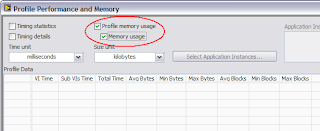
Select Profile Memory Usage to see how much memory each of your VIs is consuming.


Here's a simple VI I wrote that contains an array control wired to an array indicator. I changed the data type of the array element to be a 1-byte integer. This makes it easy to see how much memory the array is taking--one million array elements equals one million bytes. (If we had an array of doubles, one million array elements equals eight million bytes.)


I've initialized the control to have one million elements. (Actually, 1,000,001, but who's counting. ;-) Before I run the VI, it is using 1 million bytes for its data--the indicator is an empty array. The profiler won't show you this; it doesn't do its thing until you run the VI.


Okay, once I run the VI, how much memory do you think it takes? Let's see what the profiler says...
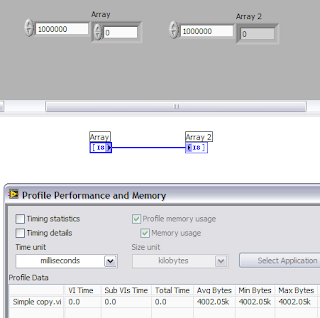


Approximately 4 million bytes! What's going on?


In my last blog entry, I said I'd tell you about the three kinds of data in LabVIEW, and they're all showing up in this profile result. The three types of data are...


  • Operate Data—Every front panel control and indicator keeps data that we call the "operate data".

  • Execute Data—Every wire on the diagram represents a buffer of data. The data for the diagram is called "execute data" or "execution data".

  • Transfer Data—Buffer used to isolate execution threads (which work with execution data) from the user interface thread (which works with operate data).


So why do we need these three kinds of data? As we'll see in later postings, the diagram likes to share execution data buffers among parts of the diagram, so the data that originally came from a control can get overwritten with intermediate and final results as the VI executes. You don't want front panel control's data to be changing while the VI runs, though! This means that we have to have a separation between the diagram and the panel.


The transfer buffer is used as an optimization in LabVIEW's multithreaded execution system. When the diagram wants to send data to an indicator, it has to work with LabVIEW's user interface thread to draw the data. There can be many execution threads, but there's only one user interface (UI) thread. Thus, the UI thread can potentially be a big bottleneck if all those execution threads had to sit and wait for it. That's where the transfer buffer comes in. It's a buffer that both the UI thread and execution threads can quickly access without (usually) blocking.


So when a block diagram updates an indicator, the execution data is copied to the transfer buffer by an execution thread, and some time later, the UI thread reads the transfer buffer and copies the data to the operate data.


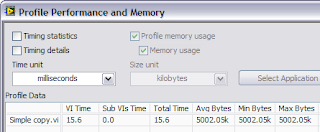
So back to our example. We have a million bytes in the control (operate data), a million bytes in the control's transfer buffer, a million bytes on the wire (execute data), a million bytes in the indicator's transfer buffer, and a million bytes in the indicator (operate data). That adds up to five million bytes, right?


But the profile window said four million. What's the deal? Recall that I said that the profiler does its thing while the VI is running. It turns out that in this simple diagram, the VI stops running before the UI thread has had a chance to make the last copy of the data (from the transfer buffer to the indicator's operate data).


When profiling, I tell people to run their VIs a few times to make sure that buffers are allocated. If I run the VI again, I'll now see five million bytes...


If this were a more realistically complicated VI, there's a good chance that the profiler would have counted all the data the first time.


Next up... I lied. There's a fourth kind of data that can show up in the profile window. What is it?


Read more of this article...